
AWS Lakehouse Architecture: Hướng Dẫn Toàn Diện Xây Dựng Data Platform Hiện Đại
Mục lục
- TL;DR
- 1. Giới Thiệu về Data Lakehouse
- 1.1. Data Lakehouse là gì?
- 1.2. Tại Sao Chọn AWS Stack (S3 + Iceberg + Glue + Athena)?
- 1.3. Lợi Ích của Kiến Trúc Này
- 2. Tổng Quan Kiến Trúc và Mối Quan Hệ Giữa Các Component
- 2.1. Kiến Trúc Tổng Thể
- 2.2. Chi Tiết Từng Layer
- 2.2.1. Storage Layer (Amazon S3)
- 2.2.2. Table Format Layer (Apache Iceberg)
- 2.2.3. Metadata & Catalog Layer (AWS Glue Data Catalog)
- 2.2.4. Query & Compute Layer
- 2.3. Data Flow trong Lakehouse
- 2.4. Decoupling Compute và Storage
- 3. Hướng Dẫn Triển Khai Từng Bước
- 3.1. Prerequisites
- 3.2. Bước 1: Thiết Lập S3 Bucket Structure
- 3.2.1. Zone-Based Organization
- 3.2.2. Terraform Configuration cho S3
- 3.2.3. CloudFormation Template cho S3
- 3.3. Bước 2: Thiết Lập AWS Glue Data Catalog
- 3.3.1. Tạo Glue Database
- 3.3.2. Terraform Configuration cho Glue Database
- 3.4. Bước 3: Tạo Iceberg Tables
- 3.4.1. Sử dụng Athena để Tạo Iceberg Table
- 3.4.2. Sử dụng PySpark với Iceberg
- 3.5. Bước 4: Thiết Lập ETL Pipeline với Glue
- 3.5.1. Glue Job để Write Iceberg Data
- 3.5.2. Terraform Configuration cho Glue Job
- 3.6. Bước 5: Query Data với Athena
- 3.6.1. Basic Queries
- 3.6.2. Python Script để Query Athena
- 3.7. Lưu Ý Quan Trọng về Implementation
- 4. Quản Lý Metadata Best Practices
- 4.1. Hiểu về Iceberg Metadata Architecture
- 4.2. Best Practices cho Metadata Management
- 4.2.1. Prefer Table-Level Metadata trong Iceberg
- 4.2.2. Sử dụng Glue Data Catalog cho Discovery
- 4.2.3. Metadata Hygiene và Maintenance
- 4.3. Monitoring Metadata Health
- 4.3.1. Key Metrics to Monitor
- 4.3.2. CloudWatch Metrics
- 4.4. Metadata Versioning và Backup
- 4.4.1. Enable S3 Versioning cho Metadata
- 4.4.2. Backup Metadata Files
- 5. Chiến Lược Table Evolution
- 5.1. Schema Evolution với Iceberg
- 5.1.1. Các Loại Schema Changes Được Hỗ Trợ
- 5.1.2. Best Practices cho Schema Evolution
- 5.2. Time Travel và Snapshot Management
- 5.2.1. Query Historical Data
- 5.2.2. Rollback to Previous Snapshot
- 5.2.3. Snapshot Retention Strategy
- 5.3. Partition Evolution
- 5.3.1. Change Partition Spec
- 5.3.2. Hidden Partitioning
- 5.3.3. Best Practices cho Partition Evolution
- 6. Chiến Lược Partitioning và Các Lỗi Thường Gặp
- 6.1. Partitioning Fundamentals
- 6.1.1. Iceberg Partition Transforms
- 6.2. Partitioning Strategies
- 6.2.1. Time-Based Partitioning
- 6.2.2. Multi-Dimensional Partitioning
- 6.2.3. Bucketing for High-Cardinality Columns
- 6.3. Common Partitioning Pitfalls
- 6.3.1. Pitfall #1: Too Many Small Partitions
- 6.3.2. Pitfall #2: High-Cardinality Partition Columns
- 6.3.3. Pitfall #3: Relying on S3 Prefixes for Partition Pruning
- 6.3.4. Pitfall #4: Changing Partition Schemes Frequently
- 6.4. File Sizing và Compaction
- 6.4.1. Optimal File Size
- 6.4.2. File Compaction Strategy
- 6.4.3. Automated Compaction với Glue Workflow
- 6.5. Partition Pruning Optimization
- 6.5.1. Verify Partition Pruning
- 6.5.2. Monitor Partition Pruning Effectiveness
- 7. Kỹ Thuật Tối Ưu Hóa Chi Phí
- 7.1. S3 Cost Optimization
- 7.1.1. Storage Class Optimization
- 7.1.2. Intelligent-Tiering
- 7.1.3. Compression
- 7.2. Athena Cost Optimization
- 7.2.1. Partition Pruning
- 7.2.2. Column Pruning
- 7.2.3. File Format Optimization
- 7.2.4. Query Result Reuse
- 7.2.5. Workgroup Configuration
- 7.3. Compute Cost Optimization
- 7.3.1. Right-Sizing Glue Jobs
- 7.3.2. Auto Scaling cho EMR
- 7.4. Cost Monitoring và Alerting
- 7.4.1. Cost Allocation Tags
- 7.4.2. Cost Anomaly Detection
- 7.4.3. Budget Alerts
- 8. Bảo Mật và Governance với Lake Formation
- 8.1. AWS Lake Formation Overview
- 8.2. Setting Up Lake Formation
- 8.2.1. Enable Lake Formation
- 8.2.2. Register S3 Locations
- 8.3. Access Control Patterns
- 8.3.1. Database-Level Permissions
- 8.3.2. Table-Level Permissions
- 8.3.3. Column-Level Security
- 8.3.4. Row-Level Security
- 8.4. Data Governance Best Practices
- 8.4.1. Principle of Least Privilege
- 8.4.2. Data Classification và Tagging
- 8.4.3. Audit Logging
- 8.4.4. Compliance Monitoring
- 8.5. Data Encryption
- 8.5.1. Encryption at Rest
- 8.5.2. Encryption in Transit
- 9. Performance Tuning cho Production Workloads
- 9.1. Query Performance Optimization
- 9.1.1. Iceberg Metadata Optimization
- 9.1.2. File Layout Optimization
- 9.1.3. Partition Pruning Effectiveness
- 9.2. Write Performance Optimization
- 9.2.1. Batch Size Tuning
- 9.2.2. Concurrent Writes
- 9.2.3. Write Commit Optimization
- 9.3. Athena Performance Tuning
- 9.3.1. Query Result Caching
- 9.3.2. Workload Management
- 9.4. Monitoring và Alerting
- 9.4.1. Performance Metrics Dashboard
- 9.4.2. Performance Alerts
- 10. Cân Nhắc Thực Tế cho Production
- 10.1. Initial Priorities cho Production Readiness
- 10.1.1. Establish Catalog và Snapshot Ownership
- 10.1.2. Automate Maintenance Tasks
- 10.1.3. Implement Governance Early
- 10.2. Data Quality Framework
- 10.2.1. Data Quality Checks
- 10.2.2. Automated Quality Gates
- 10.3. Disaster Recovery và Backup
- 10.3.1. Backup Strategy
- 10.3.2. Cross-Region Replication
- 10.4. Migration Patterns
- 10.4.1. Migration từ Traditional Data Warehouse
- 11. Hướng Dẫn Troubleshooting
- 11.1. Common Issues và Solutions
- 11.1.1. Query Performance Issues
- 11.1.2. Write Conflicts
- 11.1.3. Metadata Corruption
- 11.1.4. High Costs
- 11.2. Debugging Tools
- 11.2.1. Iceberg Metadata Inspector
- 11.2.2. Query Profiler
- 11.3. Monitoring Dashboard
- 12. Kết Luận và Các Bước Tiếp Theo
- 12.1. Tóm Tắt Key Takeaways
- 12.2. Best Practices Checklist
- 12.3. Các Bước Tiếp Theo
- 12.3.1. Short-term (1-3 months)
- 12.3.2. Medium-term (3-6 months)
- 12.3.3. Long-term (6-12 months)
- 12.4. Learning Resources
- 12.5. Kết Luận Cuối Cùng
- Tài Liệu Tham Khảo
Hướng dẫn chi tiết xây dựng data lakehouse production-grade trên AWS với S3, Apache Iceberg, Glue và Athena - từ kiến trúc đến triển khai thực tế
Bài viết này là phần tiếp theo của S3 Không Phải Là Database: Cách Thiết Kế Kiến Trúc Như Một Database, đi sâu vào việc triển khai một data lakehouse hoàn chỉnh trên AWS.
TL;DR
Data lakehouse kết hợp ưu điểm của data lakes (flexibility, scalability) và data warehouses (ACID, performance). Bài viết này hướng dẫn chi tiết cách xây dựng một lakehouse production-grade trên AWS sử dụng S3, Apache Iceberg, Glue và Athena, bao gồm:
- Kiến trúc tổng thể và mối quan hệ giữa các component
- Triển khai từng bước với code examples
- Cost optimization strategies
- Performance tuning best practices
- Security và governance framework
- Schema evolution và time travel
- Partitioning strategies
- Troubleshooting và monitoring
1. Giới Thiệu về Data Lakehouse
1.1. Data Lakehouse là gì?
Data lakehouse là một kiến trúc dữ liệu hiện đại kết hợp những ưu điểm tốt nhất của data lakes và data warehouses. Kiến trúc này cung cấp tính linh hoạt và khả năng mở rộng của data lakes (lưu trữ dữ liệu raw ở nhiều định dạng khác nhau) cùng với khả năng quản lý giao dịch, schema enforcement và hiệu suất query của data warehouses12.
Trong khi data lakes truyền thống gặp khó khăn với data quality, consistency và governance, và data warehouses thường tốn kém và thiếu linh hoạt, data lakehouse giải quyết những hạn chế này bằng cách:
- Lưu trữ dữ liệu ở định dạng mở (Parquet, ORC) trên object storage (S3)
- Cung cấp ACID transactions thông qua table formats như Apache Iceberg
- Hỗ trợ schema evolution và time travel
- Tách biệt compute và storage để tối ưu chi phí và khả năng mở rộng
- Cho phép nhiều query engines truy cập cùng một dữ liệu
1.2. Tại Sao Chọn AWS Stack (S3 + Iceberg + Glue + Athena)?
AWS cung cấp một bộ công cụ mạnh mẽ và tích hợp tốt để xây dựng data lakehouse:
Amazon S3 là nền tảng lưu trữ object có độ bền vững cao (99.999999999% durability), khả năng mở rộng không giới hạn và chi phí thấp. S3 đóng vai trò là single source of truth cho cả data files và Iceberg metadata 34.
Apache Iceberg là một open table format được thiết kế đặc biệt cho object storage như S3. Iceberg quản lý snapshots, manifest files và partition metadata để cung cấp atomic commits, schema evolution và time travel mà không cần duplicate data 35. Iceberg tách biệt logical partitioning khỏi physical file layout, cho phép chiến lược partitioning linh hoạt hơn so với các phương pháp dựa trên S3 prefix truyền thống 3.
AWS Glue cung cấp hai chức năng quan trọng: (1) Data Catalog để đăng ký và discover tables, và (2) serverless ETL engine để transform và write dữ liệu theo định dạng Iceberg 67. Glue Data Catalog hoạt động như metadata layer trung tâm cho các AWS services khác.
Amazon Athena là serverless query engine cho phép bạn chạy SQL queries trực tiếp trên S3 mà không cần quản lý infrastructure 89. Athena hỗ trợ native Iceberg tables và tận dụng Iceberg metadata để tối ưu query performance.
1.3. Lợi Ích của Kiến Trúc Này
Kiến trúc S3 + Iceberg + Glue + Athena mang lại nhiều lợi ích cho các tổ chức data-driven:
Tính linh hoạt và khả năng mở rộng: Lưu trữ mọi loại dữ liệu (structured, semi-structured, unstructured) với khả năng scale không giới hạn 310.
Chi phí tối ưu: Mô hình serverless và pay-as-you-go giúp giảm chi phí infrastructure. Bạn chỉ trả tiền cho storage thực tế sử dụng và queries chạy 811.
ACID transactions: Iceberg cung cấp atomicity, consistency, isolation và durability cho data operations, đảm bảo data quality và reliability 35.
Time travel và audit: Khả năng query dữ liệu tại bất kỳ snapshot nào trong quá khứ, hữu ích cho debugging, compliance và reproducible analytics 312.
Schema evolution: Thêm, xóa hoặc đổi tên columns mà không cần rewrite toàn bộ table 313.
Multi-engine support: Cùng một Iceberg table có thể được truy cập bởi nhiều engines (Athena, Spark, Presto, Trino) nhờ vào open format 314.
Governance và security: Tích hợp với Lake Formation để quản lý fine-grained access control và data governance 1516.
2. Tổng Quan Kiến Trúc và Mối Quan Hệ Giữa Các Component
2.1. Kiến Trúc Tổng Thể
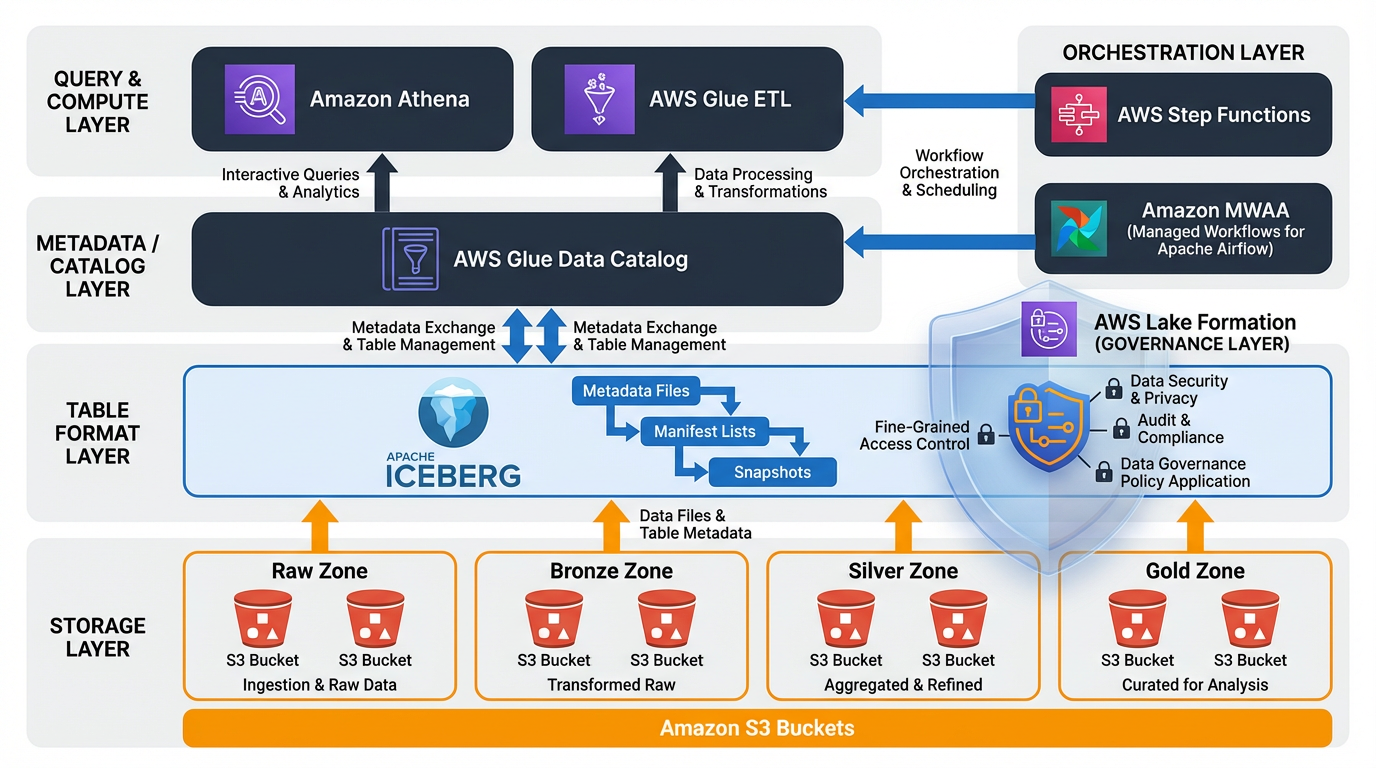
Hình 1: Kiến trúc tổng thể của AWS Data Lakehouse với các component chính và data flow
Một data lakehouse trên AWS bao gồm bốn layers chính, mỗi layer có trách nhiệm riêng biệt:
┌─────────────────────────────────────────────────────────────┐
│                    Query & Analytics Layer                  │
│  ┌──────────────┐  ┌──────────────┐  ┌──────────────┐       │
│  │   Athena     │  │  Spark/EMR   │  │  QuickSight  │       │
│  └──────────────┘  └──────────────┘  └──────────────┘       │
└─────────────────────────────────────────────────────────────┘
                              ↓
┌─────────────────────────────────────────────────────────────┐
│              Metadata & Catalog Layer                       │
│  ┌──────────────────────────────────────────────────┐       │
│  │         AWS Glue Data Catalog                    │       │
│  │  (Table registrations, Schema, Partitions)       │       │
│  └──────────────────────────────────────────────────┘       │
└─────────────────────────────────────────────────────────────┘
                              ↓
┌─────────────────────────────────────────────────────────────┐
│                  Table Format Layer                         │
│  ┌──────────────────────────────────────────────────┐       │
│  │            Apache Iceberg                        │       │
│  │  (Snapshots, Manifests, Partition Metadata)      │       │
│  └──────────────────────────────────────────────────┘       │
└─────────────────────────────────────────────────────────────┘
                              ↓
┌─────────────────────────────────────────────────────────────┐
│                    Storage Layer                            │
│  ┌──────────────────────────────────────────────────┐       │
│  │              Amazon S3                           │       │
│  │  (Data files: Parquet/ORC + Iceberg metadata)    │       │
│  └──────────────────────────────────────────────────┘       │
└─────────────────────────────────────────────────────────────┘
2.2. Chi Tiết Từng Layer
2.2.1. Storage Layer (Amazon S3)
S3 là foundation của lakehouse, lưu trữ cả data files và Iceberg metadata objects. S3 hoạt động như single source of truth cho toàn bộ hệ thống 34.
Trách nhiệm chính:
- Lưu trữ data files (Parquet, ORC, Avro)
- Lưu trữ Iceberg metadata files (snapshots, manifest lists, manifest files)
- Cung cấp durability và availability cao
- Hỗ trợ lifecycle policies để tối ưu chi phí
Best practices:
- Tổ chức data theo zone structure (raw/bronze, processed/silver, curated/gold)
- Enable versioning cho critical data
- Sử dụng encryption at rest (SSE-S3 hoặc SSE-KMS)
- Áp dụng lifecycle policies để transition sang storage classes rẻ hơn
2.2.2. Table Format Layer (Apache Iceberg)
Iceberg là table format mở cung cấp transactional capabilities trên object storage. Iceberg quản lý metadata riêng biệt khỏi data files, cho phép atomic operations và efficient metadata operations 35.
Iceberg metadata hierarchy:
Table Metadata File (JSON)
    ↓
Snapshot (version của table tại một thời điểm)
    ↓
Manifest List (danh sách các manifest files)
    ↓
Manifest Files (metadata về data files)
    ↓
Data Files (Parquet/ORC files chứa actual data)
Trách nhiệm chính:
- Quản lý table snapshots để hỗ trợ time travel
- Maintain manifest files để track data files và statistics
- Cung cấp ACID guarantees cho concurrent operations
- Hỗ trợ schema evolution và partition evolution
- Optimize metadata operations (partition pruning, file pruning)
Lợi ích của Iceberg:
- Metadata scalability: Iceberg được thiết kế để handle tables với hàng triệu files và partitions 317
- Hidden partitioning: Users không cần biết partition scheme khi query 3
- Partition evolution: Thay đổi partition strategy mà không cần rewrite data 3
- Snapshot isolation: Concurrent readers và writers không block nhau 35
2.2.3. Metadata & Catalog Layer (AWS Glue Data Catalog)
Glue Data Catalog là centralized metadata repository cho AWS analytics services. Nó lưu trữ table definitions, schemas và partition information 67.
Trách nhiệm chính:
- Đăng ký và discover Iceberg tables
- Lưu trữ table schemas và properties
- Cung cấp metadata cho query engines (Athena, EMR, Redshift Spectrum)
- Integrate với Lake Formation cho access control
Mối quan hệ giữa Glue Catalog và Iceberg:
- Glue for discovery, Iceberg for transactional state: Glue Catalog hoạt động như registration và discovery layer, trong khi Iceberg snapshots trên S3 là source of truth cho table state và history 63
- Glue Catalog lưu trữ pointer đến Iceberg table metadata location trên S3
- Query engines sử dụng Glue để discover tables, sau đó đọc Iceberg metadata để execute queries
2.2.4. Query & Compute Layer
Layer này bao gồm các query engines và processing frameworks có thể đọc và write Iceberg tables.
Amazon Athena:
- Serverless query engine, không cần manage infrastructure
- Native support cho Iceberg tables
- Pay-per-query pricing model
- Tích hợp tốt với Glue Catalog 89
AWS Glue ETL:
- Serverless Spark-based ETL service
- Có thể write Iceberg-compliant files
- Hỗ trợ scheduled và event-driven workflows 618
Amazon EMR:
- Managed Hadoop/Spark clusters
- Full control over cluster configuration
- Hỗ trợ Iceberg writes và advanced operations 19
2.3. Data Flow trong Lakehouse
Một typical data flow trong lakehouse bao gồm các bước sau:
1. Data Ingestion:
Source Systems → Kinesis/Kafka → S3 (Raw Zone)
                    ↓
              Glue ETL Job
                    ↓
         S3 (Processed Zone - Iceberg Tables)
2. Data Transformation:
Raw Iceberg Tables → Glue/Spark ETL → Curated Iceberg Tables
                                            ↓
                                    Glue Catalog Registration
3. Data Query:
User/Application → Athena → Glue Catalog → Iceberg Metadata → S3 Data Files
2.4. Decoupling Compute và Storage
Một trong những lợi ích lớn nhất của kiến trúc này là sự tách biệt hoàn toàn giữa compute và storage 310:
Lợi ích:
- Independent scaling: Scale storage và compute độc lập dựa trên needs
- Cost optimization: Tắt compute khi không sử dụng, chỉ trả tiền cho storage
- Multi-engine access: Nhiều engines có thể access cùng data đồng thời
- Reduced operational overhead: Không cần manage storage trên compute clusters
Ví dụ thực tế:
- Sử dụng Athena cho ad-hoc queries (serverless, pay-per-query)
- Sử dụng EMR cho complex ETL jobs (managed clusters)
- Sử dụng Redshift Spectrum cho warehouse queries
- Tất cả đều access cùng Iceberg tables trên S3
3. Hướng Dẫn Triển Khai Từng Bước
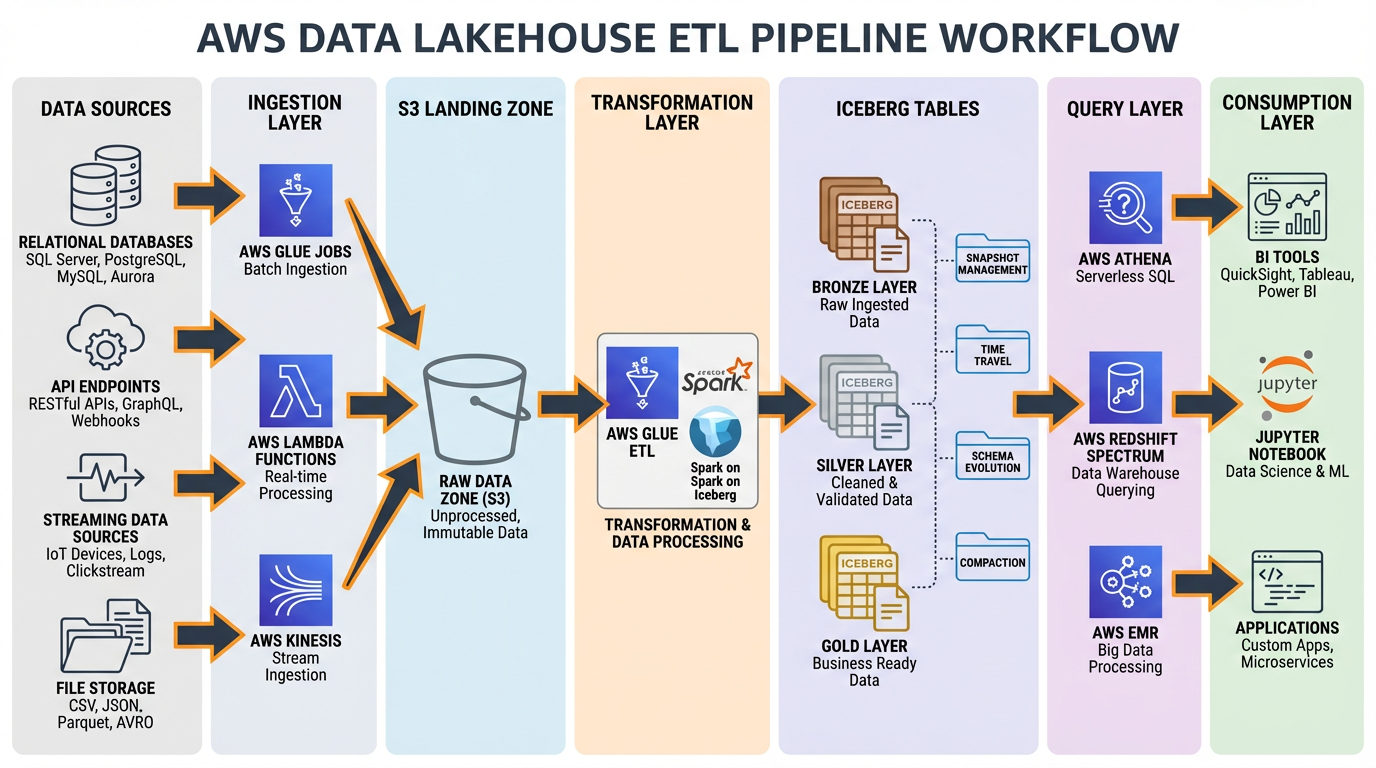
Hình 2: End-to-end ETL pipeline với Iceberg, từ data sources đến consumption layer
3.1. Prerequisites
Trước khi bắt đầu, đảm bảo bạn có:
- AWS Account với appropriate permissions
- AWS CLI configured
- Terraform hoặc CloudFormation knowledge (optional, cho IaC)
- Python 3.8+ (cho ETL scripts)
- Basic understanding của SQL và data modeling
3.2. Bước 1: Thiết Lập S3 Bucket Structure
3.2.1. Zone-Based Organization
Tổ chức S3 buckets theo zone model để quản lý data lifecycle và access controls 2021:
my-lakehouse-bucket/
├── raw/              # Bronze zone - raw ingested data
│   ├── source1/
│   └── source2/
├── processed/        # Silver zone - cleaned and validated data
│   ├── table1/
│   └── table2/
└── curated/          # Gold zone - business-ready aggregated data
    ├── analytics/
    └── reporting/
3.2.2. Terraform Configuration cho S3
# main.tf
terraform {
  required_providers {
    aws = {
      source  = "hashicorp/aws"
      version = "~> 5.0"
    }
  }
}

provider "aws" {
  region = var.aws_region
}

# S3 Bucket cho Lakehouse
resource "aws_s3_bucket" "lakehouse" {
  bucket = "${var.project_name}-lakehouse-${var.environment}"

  tags = {
    Name        = "Lakehouse Data Storage"
    Environment = var.environment
    ManagedBy   = "Terraform"
  }
}

# Enable versioning
resource "aws_s3_bucket_versioning" "lakehouse" {
  bucket = aws_s3_bucket.lakehouse.id

  versioning_configuration {
    status = "Enabled"
  }
}

# Server-side encryption
resource "aws_s3_bucket_server_side_encryption_configuration" "lakehouse" {
  bucket = aws_s3_bucket.lakehouse.id

  rule {
    apply_server_side_encryption_by_default {
      sse_algorithm = "AES256"
    }
  }
}

# Block public access
resource "aws_s3_bucket_public_access_block" "lakehouse" {
  bucket = aws_s3_bucket.lakehouse.id

  block_public_acls       = true
  block_public_policy     = true
  ignore_public_acls      = true
  restrict_public_buckets = true
}

# Lifecycle policy cho cost optimization
resource "aws_s3_bucket_lifecycle_configuration" "lakehouse" {
  bucket = aws_s3_bucket.lakehouse.id

  rule {
    id     = "transition-raw-to-ia"
    status = "Enabled"

    filter {
      prefix = "raw/"
    }

    transition {
      days          = 30
      storage_class = "STANDARD_IA"
    }

    transition {
      days          = 90
      storage_class = "GLACIER_IR"
    }
  }

  rule {
    id     = "expire-old-versions"
    status = "Enabled"

    noncurrent_version_expiration {
      noncurrent_days = 90
    }
  }
}

# Variables
variable "project_name" {
  description = "Project name for resource naming"
  type        = string
  default     = "my-lakehouse"
}

variable "environment" {
  description = "Environment (dev, staging, prod)"
  type        = string
  default     = "dev"
}

variable "aws_region" {
  description = "AWS region"
  type        = string
  default     = "us-east-1"
}
3.2.3. CloudFormation Template cho S3
# s3-lakehouse.yaml
AWSTemplateFormatVersion: '2010-09-09'
Description: 'S3 Bucket for Data Lakehouse'

Parameters:
  ProjectName:
    Type: String
    Default: my-lakehouse
    Description: Project name for resource naming

  Environment:
    Type: String
    Default: dev
    AllowedValues:
      - dev
      - staging
      - prod
    Description: Environment name

Resources:
  LakehouseBucket:
    Type: AWS::S3::Bucket
    Properties:
      BucketName: !Sub '${ProjectName}-lakehouse-${Environment}'
      VersioningConfiguration:
        Status: Enabled
      BucketEncryption:
        ServerSideEncryptionConfiguration:
          - ServerSideEncryptionByDefault:
              SSEAlgorithm: AES256
      PublicAccessBlockConfiguration:
        BlockPublicAcls: true
        BlockPublicPolicy: true
        IgnorePublicAcls: true
        RestrictPublicBuckets: true
      LifecycleConfiguration:
        Rules:
          - Id: TransitionRawToIA
            Status: Enabled
            Prefix: raw/
            Transitions:
              - TransitionInDays: 30
                StorageClass: STANDARD_IA
              - TransitionInDays: 90
                StorageClass: GLACIER_IR
          - Id: ExpireOldVersions
            Status: Enabled
            NoncurrentVersionExpiration:
              NoncurrentDays: 90
      Tags:
        - Key: Name
          Value: Lakehouse Data Storage
        - Key: Environment
          Value: !Ref Environment
        - Key: ManagedBy
          Value: CloudFormation

Outputs:
  BucketName:
    Description: Name of the S3 bucket
    Value: !Ref LakehouseBucket
    Export:
      Name: !Sub '${AWS::StackName}-BucketName'

  BucketArn:
    Description: ARN of the S3 bucket
    Value: !GetAtt LakehouseBucket.Arn
    Export:
      Name: !Sub '${AWS::StackName}-BucketArn'
3.3. Bước 2: Thiết Lập AWS Glue Data Catalog
3.3.1. Tạo Glue Database
# create_glue_database.py
import boto3

glue_client = boto3.client('glue', region_name='us-east-1')

def create_glue_database(database_name, description):
    """
    Tạo Glue database cho lakehouse
    """
    try:
        response = glue_client.create_database(
            DatabaseInput={
                'Name': database_name,
                'Description': description,
                'LocationUri': f's3://my-lakehouse-bucket/processed/',
                'Parameters': {
                    'classification': 'iceberg',
                    'table_type': 'ICEBERG'
                }
            }
        )
        print(f"Database {database_name} created successfully")
        return response
    except glue_client.exceptions.AlreadyExistsException:
        print(f"Database {database_name} already exists")
    except Exception as e:
        print(f"Error creating database: {str(e)}")
        raise

# Tạo databases cho các zones khác nhau
create_glue_database('lakehouse_raw', 'Raw data zone')
create_glue_database('lakehouse_processed', 'Processed data zone')
create_glue_database('lakehouse_curated', 'Curated data zone')
3.3.2. Terraform Configuration cho Glue Database
# glue.tf
resource "aws_glue_catalog_database" "raw" {
  name        = "${var.project_name}_raw"
  description = "Raw data zone"

  location_uri = "s3://${aws_s3_bucket.lakehouse.id}/raw/"

  parameters = {
    classification = "iceberg"
    table_type     = "ICEBERG"
  }
}

resource "aws_glue_catalog_database" "processed" {
  name        = "${var.project_name}_processed"
  description = "Processed data zone"

  location_uri = "s3://${aws_s3_bucket.lakehouse.id}/processed/"

  parameters = {
    classification = "iceberg"
    table_type     = "ICEBERG"
  }
}

resource "aws_glue_catalog_database" "curated" {
  name        = "${var.project_name}_curated"
  description = "Curated data zone"

  location_uri = "s3://${aws_s3_bucket.lakehouse.id}/curated/"

  parameters = {
    classification = "iceberg"
    table_type     = "ICEBERG"
  }
}
3.4. Bước 3: Tạo Iceberg Tables
3.4.1. Sử dụng Athena để Tạo Iceberg Table
-- create_iceberg_table.sql
-- Tạo Iceberg table trong Athena

CREATE TABLE lakehouse_processed.customer_events (
    event_id STRING,
    customer_id STRING,
    event_type STRING,
    event_timestamp TIMESTAMP,
    event_data MAP<STRING, STRING>,
    event_date DATE
)
PARTITIONED BY (event_date)
LOCATION 's3://my-lakehouse-bucket/processed/customer_events/'
TBLPROPERTIES (
    'table_type' = 'ICEBERG',
    'format' = 'parquet',
    'write_compression' = 'snappy',
    'optimize_rewrite_delete_file_threshold' = '10'
);
3.4.2. Sử dụng PySpark với Iceberg
# create_iceberg_table_spark.py
from pyspark.sql import SparkSession
from pyspark.sql.types import StructType, StructField, StringType, TimestampType, DateType, MapType

# Khởi tạo Spark session với Iceberg support
spark = SparkSession.builder \
    .appName("CreateIcebergTable") \
    .config("spark.sql.extensions", "org.apache.iceberg.spark.extensions.IcebergSparkSessionExtensions") \
    .config("spark.sql.catalog.glue_catalog", "org.apache.iceberg.spark.SparkCatalog") \
    .config("spark.sql.catalog.glue_catalog.warehouse", "s3://my-lakehouse-bucket/processed/") \
    .config("spark.sql.catalog.glue_catalog.catalog-impl", "org.apache.iceberg.aws.glue.GlueCatalog") \
    .config("spark.sql.catalog.glue_catalog.io-impl", "org.apache.iceberg.aws.s3.S3FileIO") \
    .getOrCreate()

# Define schema
schema = StructType([
    StructField("event_id", StringType(), False),
    StructField("customer_id", StringType(), False),
    StructField("event_type", StringType(), False),
    StructField("event_timestamp", TimestampType(), False),
    StructField("event_data", MapType(StringType(), StringType()), True),
    StructField("event_date", DateType(), False)
])

# Tạo Iceberg table
spark.sql("""
    CREATE TABLE IF NOT EXISTS glue_catalog.lakehouse_processed.customer_events (
        event_id STRING,
        customer_id STRING,
        event_type STRING,
        event_timestamp TIMESTAMP,
        event_data MAP<STRING, STRING>,
        event_date DATE
    )
    USING iceberg
    PARTITIONED BY (days(event_date))
    LOCATION 's3://my-lakehouse-bucket/processed/customer_events/'
    TBLPROPERTIES (
        'format-version' = '2',
        'write.parquet.compression-codec' = 'snappy'
    )
""")

print("Iceberg table created successfully")
3.5. Bước 4: Thiết Lập ETL Pipeline với Glue
3.5.1. Glue Job để Write Iceberg Data
# glue_etl_iceberg.py
import sys
from awsglue.transforms import *
from awsglue.utils import getResolvedOptions
from pyspark.context import SparkContext
from awsglue.context import GlueContext
from awsglue.job import Job
from awsglue.dynamicframe import DynamicFrame
from pyspark.sql.functions import col, to_date, current_timestamp

# Initialize contexts
args = getResolvedOptions(sys.argv, ['JOB_NAME', 'database_name', 'table_name', 'source_path'])
sc = SparkContext()
glueContext = GlueContext(sc)
spark = glueContext.spark_session
job = Job(glueContext)
job.init(args['JOB_NAME'], args)

# Configure Iceberg
spark.conf.set("spark.sql.extensions", "org.apache.iceberg.spark.extensions.IcebergSparkSessionExtensions")
spark.conf.set("spark.sql.catalog.glue_catalog", "org.apache.iceberg.spark.SparkCatalog")
spark.conf.set("spark.sql.catalog.glue_catalog.catalog-impl", "org.apache.iceberg.aws.glue.GlueCatalog")
spark.conf.set("spark.sql.catalog.glue_catalog.io-impl", "org.apache.iceberg.aws.s3.S3FileIO")

# Read source data
source_df = spark.read \
    .format("json") \
    .load(args['source_path'])

# Transform data
transformed_df = source_df \
    .withColumn("event_date", to_date(col("event_timestamp"))) \
    .withColumn("processed_at", current_timestamp())

# Write to Iceberg table
transformed_df.writeTo(f"glue_catalog.{args['database_name']}.{args['table_name']}") \
    .using("iceberg") \
    .tableProperty("format-version", "2") \
    .tableProperty("write.parquet.compression-codec", "snappy") \
    .append()

job.commit()
print(f"Successfully wrote data to {args['database_name']}.{args['table_name']}")
3.5.2. Terraform Configuration cho Glue Job
# glue_job.tf
resource "aws_iam_role" "glue_job_role" {
  name = "${var.project_name}-glue-job-role"

  assume_role_policy = jsonencode({
    Version = "2012-10-17"
    Statement = [
      {
        Action = "sts:AssumeRole"
        Effect = "Allow"
        Principal = {
          Service = "glue.amazonaws.com"
        }
      }
    ]
  })
}

resource "aws_iam_role_policy_attachment" "glue_service_role" {
  role       = aws_iam_role.glue_job_role.name
  policy_arn = "arn:aws:iam::aws:policy/service-role/AWSGlueServiceRole"
}

resource "aws_iam_role_policy" "glue_s3_policy" {
  name = "${var.project_name}-glue-s3-policy"
  role = aws_iam_role.glue_job_role.id

  policy = jsonencode({
    Version = "2012-10-17"
    Statement = [
      {
        Effect = "Allow"
        Action = [
          "s3:GetObject",
          "s3:PutObject",
          "s3:DeleteObject",
          "s3:ListBucket"
        ]
        Resource = [
          "${aws_s3_bucket.lakehouse.arn}",
          "${aws_s3_bucket.lakehouse.arn}/*"
        ]
      }
    ]
  })
}

resource "aws_glue_job" "iceberg_etl" {
  name     = "${var.project_name}-iceberg-etl"
  role_arn = aws_iam_role.glue_job_role.arn

  command {
    name            = "glueetl"
    script_location = "s3://${aws_s3_bucket.lakehouse.id}/scripts/glue_etl_iceberg.py"
    python_version  = "3"
  }

  default_arguments = {
    "--job-language"                     = "python"
    "--job-bookmark-option"              = "job-bookmark-enable"
    "--enable-metrics"                   = "true"
    "--enable-continuous-cloudwatch-log" = "true"
    "--enable-spark-ui"                  = "true"
    "--spark-event-logs-path"            = "s3://${aws_s3_bucket.lakehouse.id}/spark-logs/"
    "--datalake-formats"                 = "iceberg"
    "--conf"                             = "spark.sql.extensions=org.apache.iceberg.spark.extensions.IcebergSparkSessionExtensions"
  }

  glue_version      = "4.0"
  max_retries       = 1
  timeout           = 60
  number_of_workers = 10
  worker_type       = "G.1X"

  tags = {
    Name        = "Iceberg ETL Job"
    Environment = var.environment
  }
}
3.6. Bước 5: Query Data với Athena
3.6.1. Basic Queries
-- Query Iceberg table
SELECT
    event_type,
    COUNT(*) as event_count,
    COUNT(DISTINCT customer_id) as unique_customers
FROM lakehouse_processed.customer_events
WHERE event_date >= DATE '2024-01-01'
GROUP BY event_type
ORDER BY event_count DESC;

-- Time travel query (query snapshot tại thời điểm cụ thể)
SELECT *
FROM lakehouse_processed.customer_events
FOR SYSTEM_TIME AS OF TIMESTAMP '2024-01-15 10:00:00'
WHERE customer_id = 'CUST123';

-- Query specific snapshot
SELECT *
FROM lakehouse_processed.customer_events
FOR SYSTEM_VERSION AS OF 1234567890
LIMIT 100;
3.6.2. Python Script để Query Athena
# query_athena.py
import boto3
import time
import pandas as pd

class AthenaQueryExecutor:
    def __init__(self, database, output_location, region='us-east-1'):
        self.athena_client = boto3.client('athena', region_name=region)
        self.s3_client = boto3.client('s3', region_name=region)
        self.database = database
        self.output_location = output_location

    def execute_query(self, query, wait=True):
        """
        Execute Athena query và return results
        """
        response = self.athena_client.start_query_execution(
            QueryString=query,
            QueryExecutionContext={'Database': self.database},
            ResultConfiguration={'OutputLocation': self.output_location}
        )

        query_execution_id = response['QueryExecutionId']
        print(f"Query execution ID: {query_execution_id}")

        if wait:
            return self._wait_for_query_completion(query_execution_id)

        return query_execution_id

    def _wait_for_query_completion(self, query_execution_id):
        """
        Wait cho query completion và return results
        """
        while True:
            response = self.athena_client.get_query_execution(
                QueryExecutionId=query_execution_id
            )

            status = response['QueryExecution']['Status']['State']

            if status in ['SUCCEEDED', 'FAILED', 'CANCELLED']:
                break

            print(f"Query status: {status}")
            time.sleep(2)

        if status == 'SUCCEEDED':
            print("Query succeeded!")
            return self._get_query_results(query_execution_id)
        else:
            error_message = response['QueryExecution']['Status'].get('StateChangeReason', 'Unknown error')
            raise Exception(f"Query failed with status {status}: {error_message}")

    def _get_query_results(self, query_execution_id):
        """
        Get query results và convert to pandas DataFrame
        """
        results = self.athena_client.get_query_results(
            QueryExecutionId=query_execution_id
        )

        # Extract column names
        columns = [col['Label'] for col in results['ResultSet']['ResultSetMetadata']['ColumnInfo']]

        # Extract rows
        rows = []
        for row in results['ResultSet']['Rows'][1:]:  # Skip header row
            rows.append([field.get('VarCharValue', '') for field in row['Data']])

        # Create DataFrame
        df = pd.DataFrame(rows, columns=columns)
        return df

# Usage example
if __name__ == "__main__":
    executor = AthenaQueryExecutor(
        database='lakehouse_processed',
        output_location='s3://my-lakehouse-bucket/athena-results/'
    )

    query = """
    SELECT
        event_type,
        COUNT(*) as event_count
    FROM customer_events
    WHERE event_date >= DATE '2024-01-01'
    GROUP BY event_type
    """

    results_df = executor.execute_query(query)
    print(results_df)
3.7. Lưu Ý Quan Trọng về Implementation
⚠️ Lưu ý về Code Examples:
Các code examples trên được tổng hợp từ best practices và documentation, nhưng cần được test và customize cho môi trường cụ thể của bạn. Literature review không cung cấp ready-to-run code templates, vì vậy bạn nên:
- Test thoroughly trong dev environment trước khi deploy production
- Validate engine compatibility giữa write engine (Glue/Spark) và read engine (Athena)
- Monitor costs khi chạy initial workloads
- Implement proper error handling và retry logic
- Set up CloudWatch alarms cho monitoring
4. Quản Lý Metadata Best Practices
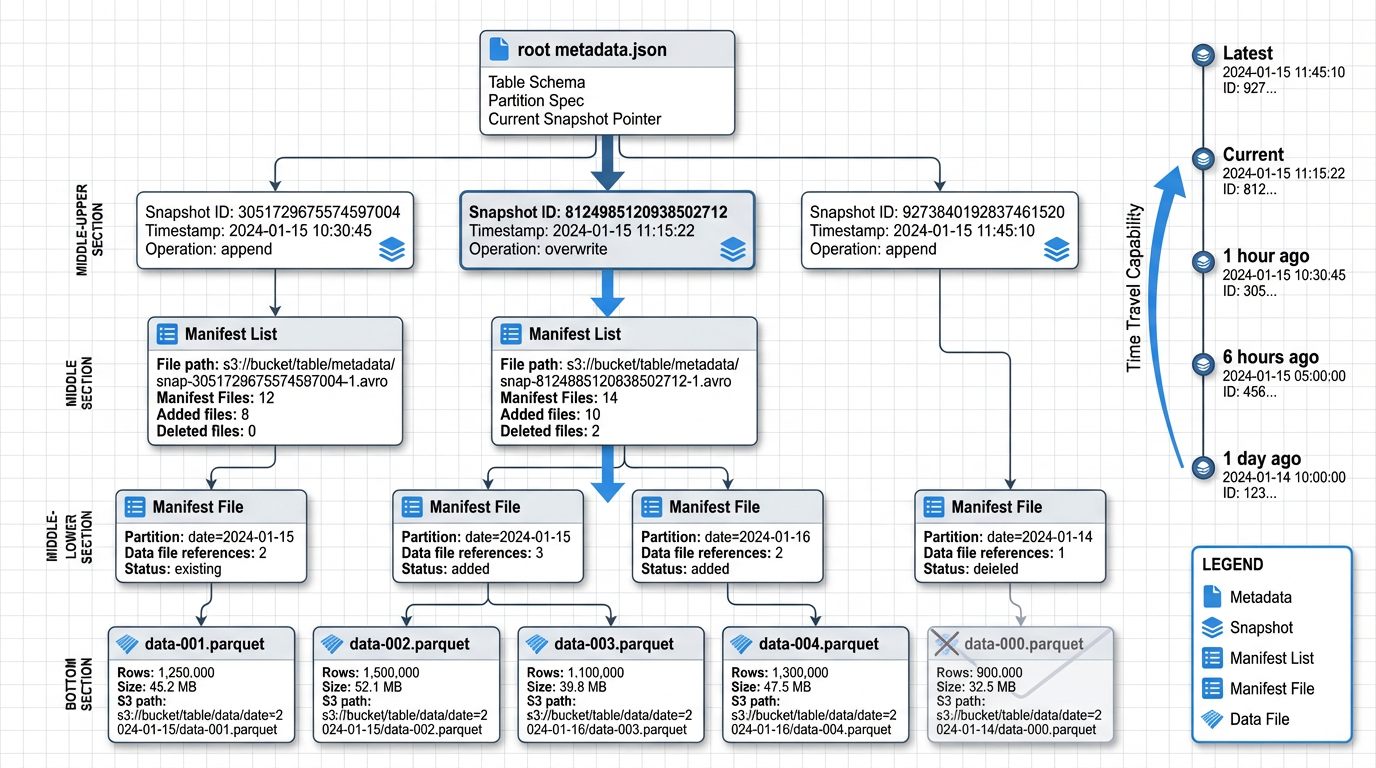
Hình 3: Cấu trúc metadata của Apache Iceberg table với snapshots, manifests và data files
4.1. Hiểu về Iceberg Metadata Architecture
Iceberg tách biệt table metadata khỏi physical data files, cho phép ACID commits, efficient snapshot isolation và time travel mà không cần duplicate data 35. Metadata hierarchy của Iceberg bao gồm:
Table Metadata File: JSON file chứa current state của table, bao gồm schema, partition spec, snapshots và properties.
Snapshots: Đại diện cho table state tại một thời điểm cụ thể. Mỗi write operation tạo một snapshot mới 312.
Manifest Lists: Danh sách các manifest files cho một snapshot, cùng với partition-level statistics.
Manifest Files: Chứa metadata về data files, bao gồm file paths, partition values, record counts và column-level statistics 3.
Data Files: Actual Parquet/ORC files chứa table data.
4.2. Best Practices cho Metadata Management
4.2.1. Prefer Table-Level Metadata trong Iceberg
Iceberg snapshots và manifests stored trên S3 là authoritative table state và enable portability across engines 314. Không nên rely solely trên external catalogs như Glue cho table state.
Lý do:
- Iceberg metadata là self-contained và portable
- Cho phép multi-engine access mà không bị lock-in
- Hỗ trợ advanced features như time travel và schema evolution
- Metadata operations (partition pruning, file pruning) hiệu quả hơn
4.2.2. Sử dụng Glue Data Catalog cho Discovery
Glue Catalog nên được sử dụng như registration và discovery layer, trong khi Iceberg snapshots trên S3 là source of truth cho table state và history 63.
Best practice pattern:
# Register Iceberg table trong Glue Catalog
glue_client.create_table(
    DatabaseName='lakehouse_processed',
    TableInput={
        'Name': 'customer_events',
        'StorageDescriptor': {
            'Location': 's3://my-lakehouse-bucket/processed/customer_events/',
            'InputFormat': 'org.apache.iceberg.mr.mapreduce.IcebergInputFormat',
            'OutputFormat': 'org.apache.iceberg.mr.mapreduce.IcebergOutputFormat',
            'SerdeInfo': {
                'SerializationLibrary': 'org.apache.iceberg.mr.hive.HiveIcebergSerDe'
            }
        },
        'Parameters': {
            'table_type': 'ICEBERG',
            'metadata_location': 's3://my-lakehouse-bucket/processed/customer_events/metadata/v1.metadata.json'
        }
    }
)
4.2.3. Metadata Hygiene và Maintenance
Run periodic metadata cleanup và manifest compaction để control số lượng và size của metadata files, improving read performance và reducing metadata overhead 322.
Recommended maintenance tasks:
1. Expire Old Snapshots:
-- Athena SQL để expire snapshots cũ hơn 7 ngày
CALL system.expire_snapshots(
    table => 'lakehouse_processed.customer_events',
    older_than => TIMESTAMP '2024-01-01 00:00:00',
    retain_last => 5
);
2. Remove Orphan Files:
-- Remove files không còn được reference bởi bất kỳ snapshot nào
CALL system.remove_orphan_files(
    table => 'lakehouse_processed.customer_events',
    older_than => TIMESTAMP '2024-01-01 00:00:00'
);
3. Rewrite Manifests:
# PySpark code để compact manifests
from pyspark.sql import SparkSession

spark = SparkSession.builder \
    .config("spark.sql.catalog.glue_catalog", "org.apache.iceberg.spark.SparkCatalog") \
    .getOrCreate()

# Rewrite manifests để reduce metadata overhead
spark.sql("""
    CALL glue_catalog.system.rewrite_manifests(
        'lakehouse_processed.customer_events'
    )
""")
4. Automated Maintenance Schedule:
# glue_maintenance_job.py
import boto3
from datetime import datetime, timedelta

def run_maintenance_tasks(database, table):
    """
    Run automated maintenance tasks cho Iceberg table
    """
    athena_client = boto3.client('athena')

    # Calculate retention date (7 days ago)
    retention_date = (datetime.now() - timedelta(days=7)).strftime('%Y-%m-%d %H:%M:%S')

    tasks = [
        # Expire old snapshots
        f"""
        CALL system.expire_snapshots(
            table => '{database}.{table}',
            older_than => TIMESTAMP '{retention_date}',
            retain_last => 5
        )
        """,

        # Remove orphan files
        f"""
        CALL system.remove_orphan_files(
            table => '{database}.{table}',
            older_than => TIMESTAMP '{retention_date}'
        )
        """,

        # Rewrite data files (compact small files)
        f"""
        CALL system.rewrite_data_files(
            table => '{database}.{table}',
            options => map('target-file-size-bytes', '536870912')
        )
        """
    ]

    for task in tasks:
        print(f"Executing: {task}")
        response = athena_client.start_query_execution(
            QueryString=task,
            QueryExecutionContext={'Database': database},
            ResultConfiguration={
                'OutputLocation': 's3://my-lakehouse-bucket/athena-results/'
            }
        )
        print(f"Query execution ID: {response['QueryExecutionId']}")

# Schedule này có thể được run bởi EventBridge hoặc Glue workflow
if __name__ == "__main__":
    run_maintenance_tasks('lakehouse_processed', 'customer_events')
4.3. Monitoring Metadata Health
4.3.1. Key Metrics to Monitor
Snapshot Count: Số lượng snapshots active. Quá nhiều snapshots có thể làm chậm metadata operations.
-- Query để check snapshot count
SELECT
    COUNT(*) as snapshot_count,
    MIN(committed_at) as oldest_snapshot,
    MAX(committed_at) as newest_snapshot
FROM lakehouse_processed.customer_events.snapshots;
Manifest File Count: Số lượng manifest files per snapshot. Quá nhiều manifest files làm tăng metadata read overhead.
-- Query để check manifest file count
SELECT
    snapshot_id,
    COUNT(*) as manifest_count
FROM lakehouse_processed.customer_events.manifests
GROUP BY snapshot_id
ORDER BY manifest_count DESC
LIMIT 10;
Data File Count và Size: Monitor số lượng và size của data files để identify small file problems.
-- Query để analyze file sizes
SELECT
    COUNT(*) as file_count,
    AVG(file_size_in_bytes) / 1024 / 1024 as avg_file_size_mb,
    MIN(file_size_in_bytes) / 1024 / 1024 as min_file_size_mb,
    MAX(file_size_in_bytes) / 1024 / 1024 as max_file_size_mb
FROM lakehouse_processed.customer_events.files;
4.3.2. CloudWatch Metrics
# publish_metadata_metrics.py
import boto3
from pyspark.sql import SparkSession

def publish_metadata_metrics(database, table):
    """
    Collect và publish metadata metrics to CloudWatch
    """
    cloudwatch = boto3.client('cloudwatch')
    spark = SparkSession.builder.getOrCreate()

    # Get snapshot count
    snapshot_df = spark.sql(f"SELECT COUNT(*) as count FROM {database}.{table}.snapshots")
    snapshot_count = snapshot_df.collect()[0]['count']

    # Get file count và average size
    files_df = spark.sql(f"""
        SELECT
            COUNT(*) as file_count,
            AVG(file_size_in_bytes) as avg_file_size
        FROM {database}.{table}.files
    """)
    file_stats = files_df.collect()[0]

    # Publish metrics
    cloudwatch.put_metric_data(
        Namespace='Lakehouse/Metadata',
        MetricData=[
            {
                'MetricName': 'SnapshotCount',
                'Value': snapshot_count,
                'Unit': 'Count',
                'Dimensions': [
                    {'Name': 'Database', 'Value': database},
                    {'Name': 'Table', 'Value': table}
                ]
            },
            {
                'MetricName': 'DataFileCount',
                'Value': file_stats['file_count'],
                'Unit': 'Count',
                'Dimensions': [
                    {'Name': 'Database', 'Value': database},
                    {'Name': 'Table', 'Value': table}
                ]
            },
            {
                'MetricName': 'AverageFileSize',
                'Value': file_stats['avg_file_size'] / 1024 / 1024,  # Convert to MB
                'Unit': 'Megabytes',
                'Dimensions': [
                    {'Name': 'Database', 'Value': database},
                    {'Name': 'Table', 'Value': table}
                ]
            }
        ]
    )

    print(f"Published metrics for {database}.{table}")
4.4. Metadata Versioning và Backup
4.4.1. Enable S3 Versioning cho Metadata
S3 versioning nên được enable cho bucket chứa Iceberg metadata để protect against accidental deletions hoặc corruptions.
# Terraform configuration đã include versioning trong section 3.2.2
resource "aws_s3_bucket_versioning" "lakehouse" {
  bucket = aws_s3_bucket.lakehouse.id

  versioning_configuration {
    status = "Enabled"
  }
}
4.4.2. Backup Metadata Files
# backup_metadata.py
import boto3
from datetime import datetime

def backup_table_metadata(source_bucket, table_path, backup_bucket):
    """
    Backup Iceberg table metadata to separate bucket
    """
    s3_client = boto3.client('s3')

    # List all metadata files
    metadata_prefix = f"{table_path}/metadata/"
    response = s3_client.list_objects_v2(
        Bucket=source_bucket,
        Prefix=metadata_prefix
    )

    if 'Contents' not in response:
        print(f"No metadata files found at {metadata_prefix}")
        return

    # Backup each metadata file
    backup_timestamp = datetime.now().strftime('%Y%m%d_%H%M%S')

    for obj in response['Contents']:
        source_key = obj['Key']
        backup_key = f"backups/{backup_timestamp}/{source_key}"

        # Copy to backup bucket
        s3_client.copy_object(
            CopySource={'Bucket': source_bucket, 'Key': source_key},
            Bucket=backup_bucket,
            Key=backup_key
        )

        print(f"Backed up {source_key} to {backup_key}")

# Usage
backup_table_metadata(
    source_bucket='my-lakehouse-bucket',
    table_path='processed/customer_events',
    backup_bucket='my-lakehouse-backup-bucket'
)
5. Chiến Lược Table Evolution
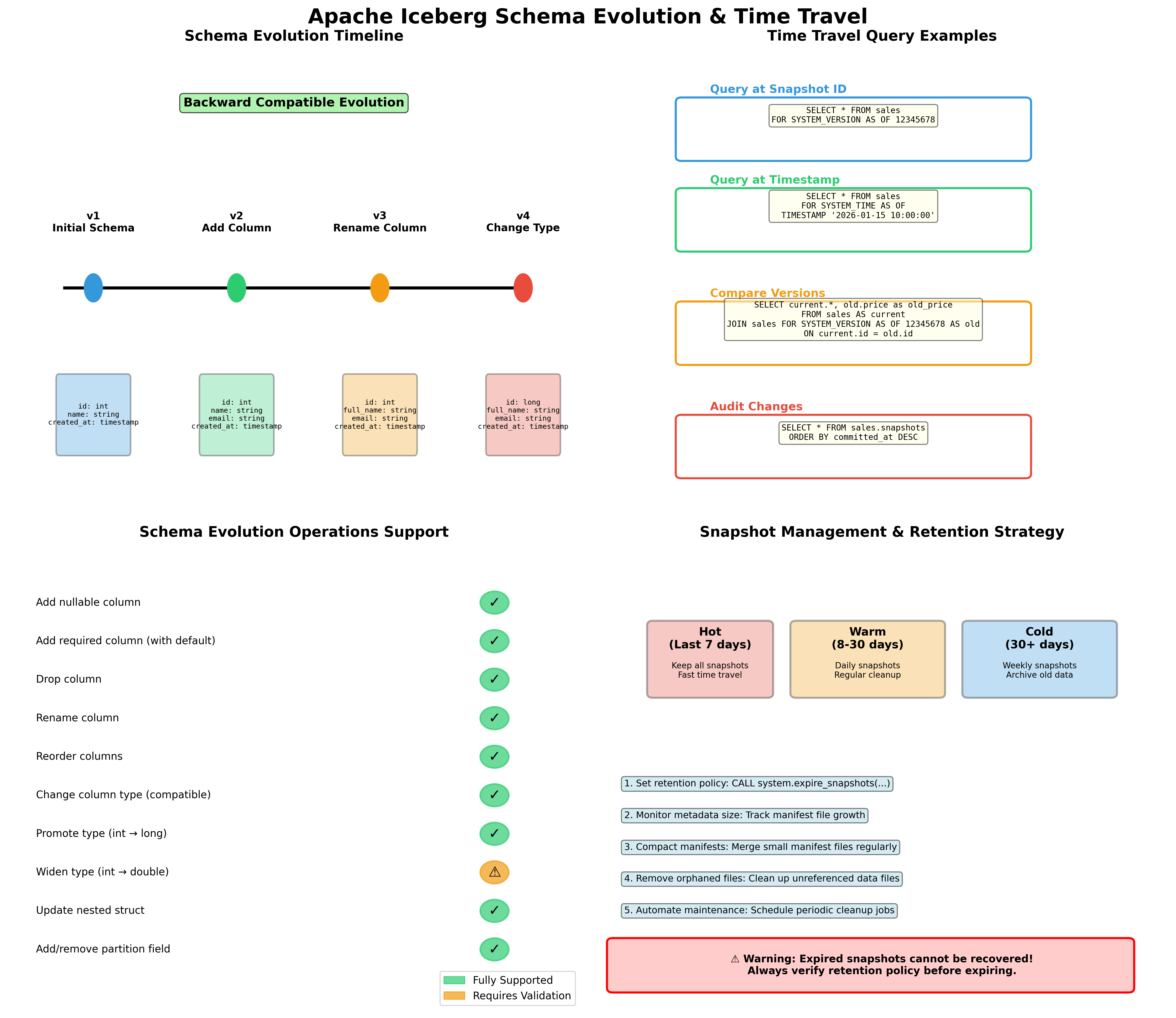
Hình 4: Schema evolution timeline, time travel queries, supported operations và snapshot management
5.1. Schema Evolution với Iceberg
Một trong những tính năng mạnh mẽ nhất của Iceberg là khả năng evolve table schema mà không cần rewrite toàn bộ data 313. Iceberg tracks schema changes trong snapshots và maintains compatibility với prior snapshots.
5.1.1. Các Loại Schema Changes Được Hỗ Trợ
Add Columns (Additive Changes):
Thêm nullable columns là straightforward và không require rewriting existing data 3.
-- Athena SQL để add column
ALTER TABLE lakehouse_processed.customer_events
ADD COLUMNS (
    user_agent STRING,
    ip_address STRING
);
# PySpark để add column
spark.sql("""
    ALTER TABLE glue_catalog.lakehouse_processed.customer_events
    ADD COLUMNS (
        user_agent STRING COMMENT 'User agent string',
        ip_address STRING COMMENT 'Client IP address'
    )
""")
Rename Columns:
Iceberg hỗ trợ column renames mà không cần rewrite data 3.
-- Rename column
ALTER TABLE lakehouse_processed.customer_events
RENAME COLUMN event_data TO event_payload;
Drop Columns:
Dropping columns chỉ updates metadata; data vẫn tồn tại trong files nhưng không visible cho queries 3.
-- Drop column
ALTER TABLE lakehouse_processed.customer_events
DROP COLUMN user_agent;
Update Column Types:
Type changes được hỗ trợ với certain restrictions (e.g., int to bigint, float to double) 3.
-- Widen column type
ALTER TABLE lakehouse_processed.customer_events
ALTER COLUMN event_id TYPE BIGINT;
Reorder Columns:
-- Reorder columns
ALTER TABLE lakehouse_processed.customer_events
CHANGE COLUMN event_timestamp event_timestamp TIMESTAMP AFTER customer_id;
5.1.2. Best Practices cho Schema Evolution
1. Plan for Evolution từ đầu:
Design schema với evolution in mind. Sử dụng nullable columns khi có thể và avoid overly restrictive constraints.
2. Test Schema Changes:
Validate schema changes trong dev environment trước khi apply to production. Test với multiple query engines để ensure compatibility 314.
# test_schema_evolution.py
def test_schema_change(database, table, new_column):
    """
    Test schema evolution trong dev environment
    """
    spark = SparkSession.builder.getOrCreate()

    # Add column
    spark.sql(f"""
        ALTER TABLE {database}.{table}
        ADD COLUMNS ({new_column})
    """)

    # Test read with old and new schema
    df = spark.table(f"{database}.{table}")
    print(f"Schema after change: {df.schema}")

    # Test query
    result = spark.sql(f"""
        SELECT COUNT(*), COUNT({new_column.split()[0]})
        FROM {database}.{table}
    """)
    result.show()
3. Document Schema Changes:
Maintain schema change log để track evolution history.
# schema_change_log.py
import boto3
import json
from datetime import datetime

def log_schema_change(database, table, change_type, details):
    """
    Log schema changes to S3 for audit trail
    """
    s3_client = boto3.client('s3')

    log_entry = {
        'timestamp': datetime.now().isoformat(),
        'database': database,
        'table': table,
        'change_type': change_type,
        'details': details
    }

    log_key = f"schema-logs/{database}/{table}/{datetime.now().strftime('%Y%m%d_%H%M%S')}.json"

    s3_client.put_object(
        Bucket='my-lakehouse-bucket',
        Key=log_key,
        Body=json.dumps(log_entry, indent=2)
    )

    print(f"Schema change logged to {log_key}")

# Usage
log_schema_change(
    database='lakehouse_processed',
    table='customer_events',
    change_type='ADD_COLUMN',
    details={'column_name': 'user_agent', 'column_type': 'STRING'}
)
4. Handle Backward Compatibility:
Khi add columns, ensure downstream applications có thể handle missing values trong old data.
# handle_schema_evolution.py
from pyspark.sql.functions import col, when, lit

def read_with_schema_evolution(database, table, default_values=None):
    """
    Read table với handling cho schema evolution
    """
    spark = SparkSession.builder.getOrCreate()
    df = spark.table(f"{database}.{table}")

    # Apply default values cho new columns nếu cần
    if default_values:
        for column, default_value in default_values.items():
            if column in df.columns:
                df = df.withColumn(
                    column,
                    when(col(column).isNull(), lit(default_value)).otherwise(col(column))
                )

    return df

# Usage
df = read_with_schema_evolution(
    database='lakehouse_processed',
    table='customer_events',
    default_values={'user_agent': 'unknown', 'ip_address': '0.0.0.0'}
)
5.2. Time Travel và Snapshot Management
Time travel là một tính năng powerful của Iceberg cho phép query dữ liệu tại bất kỳ snapshot nào trong quá khứ 312. Điều này hữu ích cho:
- Debugging: Investigate data issues bằng cách compare snapshots
- Compliance: Meet regulatory requirements cho data retention và audit
- Reproducible analytics: Ensure consistent results bằng cách query specific snapshots
- Rollback: Recover từ bad writes bằng cách rollback to previous snapshot
5.2.1. Query Historical Data
Query by Timestamp:
-- Athena SQL để query data tại specific timestamp
SELECT *
FROM lakehouse_processed.customer_events
FOR SYSTEM_TIME AS OF TIMESTAMP '2024-01-15 10:00:00'
WHERE customer_id = 'CUST123';
Query by Snapshot ID:
-- Query specific snapshot
SELECT *
FROM lakehouse_processed.customer_events
FOR SYSTEM_VERSION AS OF 1234567890
LIMIT 100;
List Available Snapshots:
-- View all snapshots
SELECT
    snapshot_id,
    committed_at,
    operation,
    summary
FROM lakehouse_processed.customer_events.snapshots
ORDER BY committed_at DESC;
5.2.2. Rollback to Previous Snapshot
-- Athena SQL để rollback table to previous snapshot
CALL system.rollback_to_snapshot(
    table => 'lakehouse_processed.customer_events',
    snapshot_id => 1234567890
);
# PySpark để rollback
spark.sql("""
    CALL glue_catalog.system.rollback_to_snapshot(
        'lakehouse_processed.customer_events',
        1234567890
    )
""")
5.2.3. Snapshot Retention Strategy
Recommended retention policy:
- Keep recent snapshots: Retain all snapshots từ last 7 days cho debugging và rollback
- Keep milestone snapshots: Retain monthly hoặc quarterly snapshots cho long-term audit
- Expire old snapshots: Automatically expire snapshots older than retention period
# snapshot_retention_policy.py
from datetime import datetime, timedelta

def apply_retention_policy(database, table, retention_days=7, milestone_day=1):
    """
    Apply snapshot retention policy
    - Keep all snapshots from last N days
    - Keep monthly milestone snapshots
    - Expire others
    """
    spark = SparkSession.builder.getOrCreate()

    # Get all snapshots
    snapshots_df = spark.sql(f"""
        SELECT
            snapshot_id,
            committed_at,
            EXTRACT(DAY FROM committed_at) as day_of_month
        FROM {database}.{table}.snapshots
    """)

    cutoff_date = datetime.now() - timedelta(days=retention_days)

    # Identify snapshots to keep
    snapshots_to_keep = []

    for row in snapshots_df.collect():
        snapshot_date = row['committed_at']

        # Keep recent snapshots
        if snapshot_date >= cutoff_date:
            snapshots_to_keep.append(row['snapshot_id'])
        # Keep milestone snapshots (first day of month)
        elif row['day_of_month'] == milestone_day:
            snapshots_to_keep.append(row['snapshot_id'])

    # Expire old snapshots (keeping identified ones)
    if snapshots_to_keep:
        # Iceberg will keep snapshots in the list
        oldest_to_expire = cutoff_date.strftime('%Y-%m-%d %H:%M:%S')

        spark.sql(f"""
            CALL glue_catalog.system.expire_snapshots(
                '{database}.{table}',
                TIMESTAMP '{oldest_to_expire}',
                {len(snapshots_to_keep)}
            )
        """)

        print(f"Applied retention policy. Kept {len(snapshots_to_keep)} snapshots.")
5.3. Partition Evolution
Iceberg cho phép change partition strategy mà không cần rewrite existing data 3. Đây là một advantage lớn so với traditional partitioning approaches.
5.3.1. Change Partition Spec
-- Athena SQL để change partition spec
ALTER TABLE lakehouse_processed.customer_events
SET PARTITION SPEC (days(event_date), bucket(10, customer_id));
# PySpark để change partition spec
spark.sql("""
    ALTER TABLE glue_catalog.lakehouse_processed.customer_events
    REPLACE PARTITION FIELD days(event_date) WITH days(event_date)
    REPLACE PARTITION FIELD customer_id WITH bucket(10, customer_id)
""")
5.3.2. Hidden Partitioning
Iceberg's hidden partitioning means users không cần specify partition predicates trong queries 3. Iceberg automatically prunes partitions based on query filters.
-- User query (không cần partition predicate)
SELECT *
FROM lakehouse_processed.customer_events
WHERE event_date = DATE '2024-01-15'
  AND customer_id = 'CUST123';

-- Iceberg automatically prunes partitions based on event_date và customer_id
5.3.3. Best Practices cho Partition Evolution
1. Start Simple:
Begin với simple partition scheme và evolve as data grows và query patterns become clear.
2. Monitor Query Patterns:
Analyze query patterns để identify optimal partition strategy.
-- Query để analyze common filters
SELECT
    query_id,
    query_text,
    data_scanned_in_bytes / 1024 / 1024 / 1024 as data_scanned_gb,
    execution_time_millis / 1000 as execution_time_sec
FROM system.query_history
WHERE database_name = 'lakehouse_processed'
  AND table_name = 'customer_events'
ORDER BY execution_time_millis DESC
LIMIT 100;
3. Test Partition Changes:
Test partition evolution trong dev environment với representative data volumes.
# test_partition_evolution.py
def test_partition_change(database, table, new_partition_spec):
    """
    Test partition evolution impact
    """
    spark = SparkSession.builder.getOrCreate()

    # Measure query performance before change
    before_start = time.time()
    spark.sql(f"""
        SELECT COUNT(*)
        FROM {database}.{table}
        WHERE event_date >= DATE '2024-01-01'
    """).collect()
    before_time = time.time() - before_start

    # Apply partition change
    spark.sql(f"""
        ALTER TABLE {database}.{table}
        SET PARTITION SPEC {new_partition_spec}
    """)

    # Measure query performance after change
    after_start = time.time()
    spark.sql(f"""
        SELECT COUNT(*)
        FROM {database}.{table}
        WHERE event_date >= DATE '2024-01-01'
    """).collect()
    after_time = time.time() - after_start

    print(f"Query time before: {before_time:.2f}s")
    print(f"Query time after: {after_time:.2f}s")
    print(f"Performance change: {((after_time - before_time) / before_time * 100):.2f}%")
6. Chiến Lược Partitioning và Các Lỗi Thường Gặp
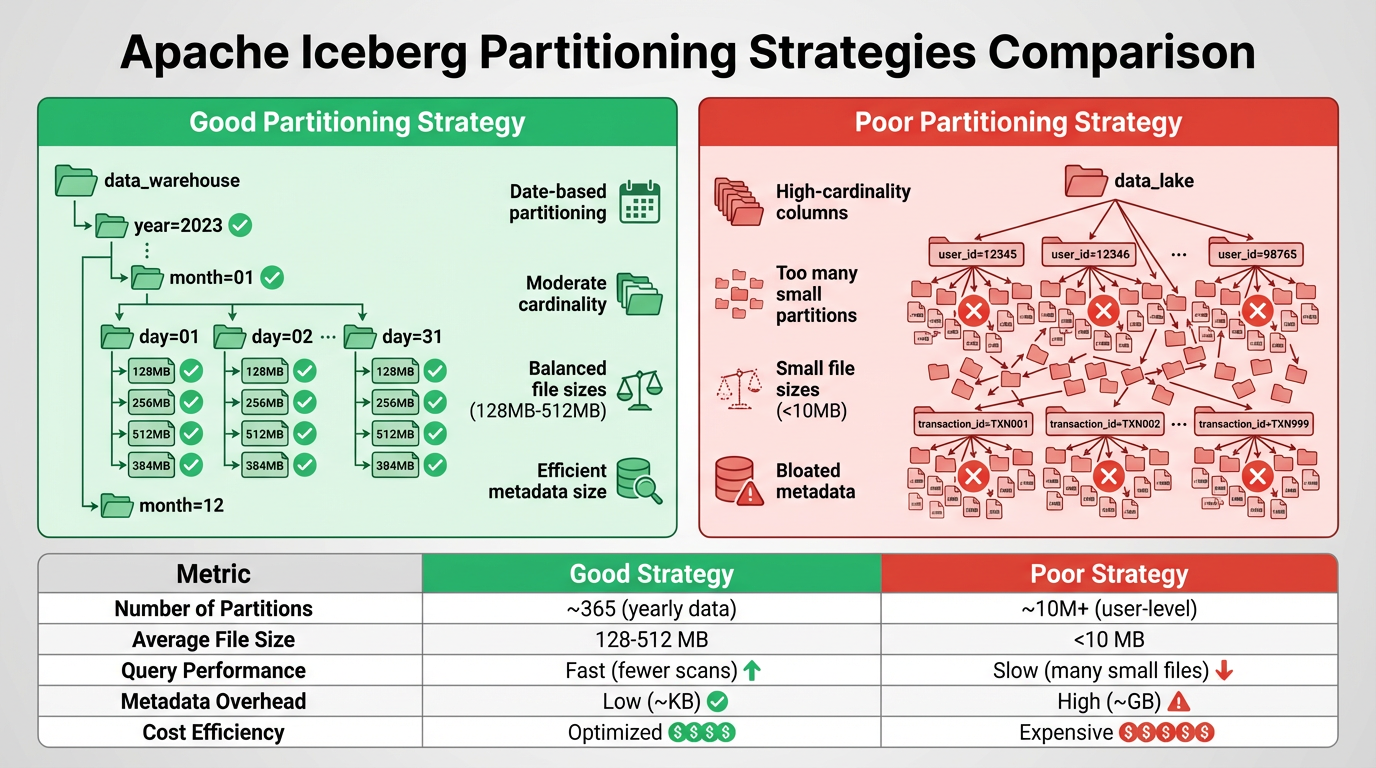
Hình 5: So sánh chiến lược partitioning tốt và kém
6.1. Partitioning Fundamentals
Partitioning là một kỹ thuật quan trọng để optimize query performance và reduce costs trong data lakehouse. Iceberg decouples logical partitioning khỏi file layout và uses metadata để avoid expensive directory listing, enabling flexible partitioning strategies 317.
6.1.1. Iceberg Partition Transforms
Iceberg cung cấp built-in partition transforms:
Identity: Partition by exact value
PARTITIONED BY (region)
Bucket: Hash-based bucketing
PARTITIONED BY (bucket(10, customer_id))
Truncate: Truncate strings to fixed length
PARTITIONED BY (truncate(5, user_id))
Year/Month/Day/Hour: Date/timestamp transforms
PARTITIONED BY (year(event_timestamp), month(event_timestamp))
-- hoặc
PARTITIONED BY (days(event_date))
6.2. Partitioning Strategies
6.2.1. Time-Based Partitioning
Time-based partitioning là most common strategy cho event data và time-series data.
Daily Partitioning:
CREATE TABLE lakehouse_processed.events (
    event_id STRING,
    event_timestamp TIMESTAMP,
    event_data MAP<STRING, STRING>
)
PARTITIONED BY (days(event_timestamp))
LOCATION 's3://my-lakehouse-bucket/processed/events/'
TBLPROPERTIES ('table_type' = 'ICEBERG');
Hourly Partitioning (cho high-volume data):
CREATE TABLE lakehouse_processed.high_volume_events (
    event_id STRING,
    event_timestamp TIMESTAMP,
    event_data MAP<STRING, STRING>
)
PARTITIONED BY (hours(event_timestamp))
LOCATION 's3://my-lakehouse-bucket/processed/high_volume_events/'
TBLPROPERTIES ('table_type' = 'ICEBERG');
Monthly Partitioning (cho historical data):
CREATE TABLE lakehouse_curated.monthly_aggregates (
    metric_name STRING,
    metric_value DOUBLE,
    aggregation_date DATE
)
PARTITIONED BY (months(aggregation_date))
LOCATION 's3://my-lakehouse-bucket/curated/monthly_aggregates/'
TBLPROPERTIES ('table_type' = 'ICEBERG');
6.2.2. Multi-Dimensional Partitioning
Combine multiple partition columns cho complex query patterns.
CREATE TABLE lakehouse_processed.customer_transactions (
    transaction_id STRING,
    customer_id STRING,
    transaction_date DATE,
    region STRING,
    amount DOUBLE
)
PARTITIONED BY (days(transaction_date), region)
LOCATION 's3://my-lakehouse-bucket/processed/customer_transactions/'
TBLPROPERTIES ('table_type' = 'ICEBERG');
⚠️ Warning: Avoid too many partition dimensions vì có thể lead to partition explosion và small file problems.
6.2.3. Bucketing for High-Cardinality Columns
Sử dụng bucketing cho high-cardinality columns như customer_id hoặc user_id 317.
CREATE TABLE lakehouse_processed.user_activities (
    user_id STRING,
    activity_type STRING,
    activity_timestamp TIMESTAMP,
    activity_data MAP<STRING, STRING>
)
PARTITIONED BY (days(activity_timestamp), bucket(100, user_id))
LOCATION 's3://my-lakehouse-bucket/processed/user_activities/'
TBLPROPERTIES ('table_type' = 'ICEBERG');
6.3. Common Partitioning Pitfalls
6.3.1. Pitfall #1: Too Many Small Partitions
Problem: Creating quá nhiều partitions với ít data mỗi partition leads to:
- Nhiều small files (poor read performance)
- Increased metadata overhead
- Higher query planning time
- Increased S3 LIST operations cost
Example of bad partitioning:
-- BAD: Partitioning by hour cho low-volume data
CREATE TABLE lakehouse_processed.low_volume_events (
    event_id STRING,
    event_timestamp TIMESTAMP
)
PARTITIONED BY (hours(event_timestamp))  -- Tạo 24 partitions/day với very little data each
Solution: Sử dụng coarser partition granularity 317.
-- GOOD: Daily partitioning cho low-volume data
CREATE TABLE lakehouse_processed.low_volume_events (
    event_id STRING,
    event_timestamp TIMESTAMP
)
PARTITIONED BY (days(event_timestamp))  -- Reasonable partition size
Rule of thumb: Mỗi partition nên có ít nhất 100MB-1GB data để balance query performance và metadata overhead.
6.3.2. Pitfall #2: High-Cardinality Partition Columns
Problem: Partitioning by high-cardinality columns (e.g., customer_id, user_id) tạo hàng nghìn hoặc hàng triệu partitions 317.
Example of bad partitioning:
-- BAD: Partitioning by customer_id (millions of unique values)
CREATE TABLE lakehouse_processed.customer_events (
    event_id STRING,
    customer_id STRING,
    event_timestamp TIMESTAMP
)
PARTITIONED BY (customer_id)  -- Millions of partitions!
Solution: Sử dụng bucketing thay vì identity partitioning 3.
-- GOOD: Bucketing customer_id
CREATE TABLE lakehouse_processed.customer_events (
    event_id STRING,
    customer_id STRING,
    event_timestamp TIMESTAMP
)
PARTITIONED BY (days(event_timestamp), bucket(100, customer_id))
6.3.3. Pitfall #3: Relying on S3 Prefixes for Partition Pruning
Problem: Traditional Hive-style partitioning relies on S3 prefix structure, requiring expensive LIST operations 3.
Example of inefficient approach:
s3://bucket/table/year=2024/month=01/day=15/file1.parquet
s3://bucket/table/year=2024/month=01/day=15/file2.parquet
Solution: Iceberg uses metadata-driven partition pruning, không cần rely on S3 prefixes 317.
# Iceberg automatically prunes partitions using metadata
# No need for S3 LIST operations
df = spark.sql("""
    SELECT *
    FROM lakehouse_processed.customer_events
    WHERE event_date = DATE '2024-01-15'
""")
# Iceberg reads manifest files to identify relevant data files
# Much faster than listing S3 prefixes
6.3.4. Pitfall #4: Changing Partition Schemes Frequently
Problem: Frequent partition scheme changes without proper migration tạo orphaned files và complex metadata history 3.
Solution: Plan partition evolution carefully và perform controlled rewrites.
# partition_migration.py
def migrate_partition_scheme(database, table, new_partition_spec):
    """
    Safely migrate to new partition scheme
    """
    spark = SparkSession.builder.getOrCreate()

    # Step 1: Create new table với new partition spec
    temp_table = f"{table}_new"
    spark.sql(f"""
        CREATE TABLE {database}.{temp_table}
        USING iceberg
        PARTITIONED BY {new_partition_spec}
        AS SELECT * FROM {database}.{table}
    """)

    # Step 2: Validate data
    old_count = spark.sql(f"SELECT COUNT(*) FROM {database}.{table}").collect()[0][0]
    new_count = spark.sql(f"SELECT COUNT(*) FROM {database}.{temp_table}").collect()[0][0]

    if old_count != new_count:
        raise Exception(f"Data validation failed: {old_count} != {new_count}")

    # Step 3: Swap tables (requires manual intervention)
    print(f"Validation successful. Ready to swap {table} with {temp_table}")
    print("Manual steps:")
    print(f"1. DROP TABLE {database}.{table}")
    print(f"2. ALTER TABLE {database}.{temp_table} RENAME TO {table}")
6.4. File Sizing và Compaction
6.4.1. Optimal File Size
Recommended file sizes:
- Minimum: 100MB per file
- Optimal: 256MB - 1GB per file
- Maximum: 2GB per file (để avoid memory issues)
Small files lead to:
- Increased query overhead (more files to open)
- Higher Athena scan costs
- Slower metadata operations
6.4.2. File Compaction Strategy
# file_compaction.py
def compact_small_files(database, table, target_file_size_mb=512):
    """
    Compact small files to improve query performance
    """
    spark = SparkSession.builder.getOrCreate()

    # Analyze current file sizes
    files_df = spark.sql(f"""
        SELECT
            COUNT(*) as file_count,
            AVG(file_size_in_bytes) / 1024 / 1024 as avg_file_size_mb,
            MIN(file_size_in_bytes) / 1024 / 1024 as min_file_size_mb,
            MAX(file_size_in_bytes) / 1024 / 1024 as max_file_size_mb
        FROM {database}.{table}.files
    """)

    stats = files_df.collect()[0]
    print(f"Current stats: {stats}")

    # Run compaction if average file size is too small
    if stats['avg_file_size_mb'] < target_file_size_mb / 2:
        print(f"Running compaction with target size {target_file_size_mb}MB...")

        spark.sql(f"""
            CALL glue_catalog.system.rewrite_data_files(
                table => '{database}.{table}',
                options => map(
                    'target-file-size-bytes', '{target_file_size_mb * 1024 * 1024}',
                    'min-file-size-bytes', '10485760'  -- 10MB minimum
                )
            )
        """)

        print("Compaction completed")
    else:
        print("No compaction needed")

# Schedule compaction job
if __name__ == "__main__":
    compact_small_files('lakehouse_processed', 'customer_events', target_file_size_mb=512)
6.4.3. Automated Compaction với Glue Workflow
# glue_compaction_workflow.tf
resource "aws_glue_workflow" "compaction" {
  name = "${var.project_name}-compaction-workflow"

  description = "Automated file compaction workflow"
}

resource "aws_glue_trigger" "compaction_schedule" {
  name          = "${var.project_name}-compaction-trigger"
  type          = "SCHEDULED"
  schedule      = "cron(0 2 * * ? *)"  # Run daily at 2 AM
  workflow_name = aws_glue_workflow.compaction.name

  actions {
    job_name = aws_glue_job.compaction.name
  }
}

resource "aws_glue_job" "compaction" {
  name     = "${var.project_name}-compaction-job"
  role_arn = aws_iam_role.glue_job_role.arn

  command {
    name            = "glueetl"
    script_location = "s3://${aws_s3_bucket.lakehouse.id}/scripts/file_compaction.py"
    python_version  = "3"
  }

  default_arguments = {
    "--database_name"     = "lakehouse_processed"
    "--table_name"        = "customer_events"
    "--target_file_size"  = "536870912"  # 512MB
  }

  glue_version = "4.0"
  worker_type  = "G.1X"
  number_of_workers = 10
}
6.5. Partition Pruning Optimization
6.5.1. Verify Partition Pruning
-- Use EXPLAIN để verify partition pruning
EXPLAIN
SELECT *
FROM lakehouse_processed.customer_events
WHERE event_date = DATE '2024-01-15'
  AND region = 'US';

-- Output should show partition filters applied
6.5.2. Monitor Partition Pruning Effectiveness
# monitor_partition_pruning.py
def analyze_query_efficiency(database, table, query):
    """
    Analyze query efficiency và partition pruning
    """
    athena_client = boto3.client('athena')

    # Execute query
    response = athena_client.start_query_execution(
        QueryString=query,
        QueryExecutionContext={'Database': database},
        ResultConfiguration={
            'OutputLocation': 's3://my-lakehouse-bucket/athena-results/'
        }
    )

    query_execution_id = response['QueryExecutionId']

    # Wait for completion
    while True:
        status_response = athena_client.get_query_execution(
            QueryExecutionId=query_execution_id
        )
        status = status_response['QueryExecution']['Status']['State']

        if status in ['SUCCEEDED', 'FAILED', 'CANCELLED']:
            break

        time.sleep(2)

    # Get statistics
    if status == 'SUCCEEDED':
        stats = status_response['QueryExecution']['Statistics']

        data_scanned_gb = stats['DataScannedInBytes'] / 1024 / 1024 / 1024
        execution_time_sec = stats['EngineExecutionTimeInMillis'] / 1000

        # Get total table size for comparison
        total_size_query = f"SELECT SUM(file_size_in_bytes) FROM {database}.{table}.files"
        total_size_response = athena_client.start_query_execution(
            QueryString=total_size_query,
            QueryExecutionContext={'Database': database},
            ResultConfiguration={
                'OutputLocation': 's3://my-lakehouse-bucket/athena-results/'
            }
        )

        # Calculate pruning efficiency
        print(f"Data scanned: {data_scanned_gb:.2f} GB")
        print(f"Execution time: {execution_time_sec:.2f} seconds")
        print(f"Query cost: ${data_scanned_gb * 0.005:.4f}")  # $5 per TB scanned

        return {
            'data_scanned_gb': data_scanned_gb,
            'execution_time_sec': execution_time_sec,
            'cost_usd': data_scanned_gb * 0.005
        }

# Usage
query = """
SELECT COUNT(*)
FROM lakehouse_processed.customer_events
WHERE event_date BETWEEN DATE '2024-01-01' AND DATE '2024-01-31'
  AND region = 'US'
"""

stats = analyze_query_efficiency('lakehouse_processed', 'customer_events', query)
7. Kỹ Thuật Tối Ưu Hóa Chi Phí
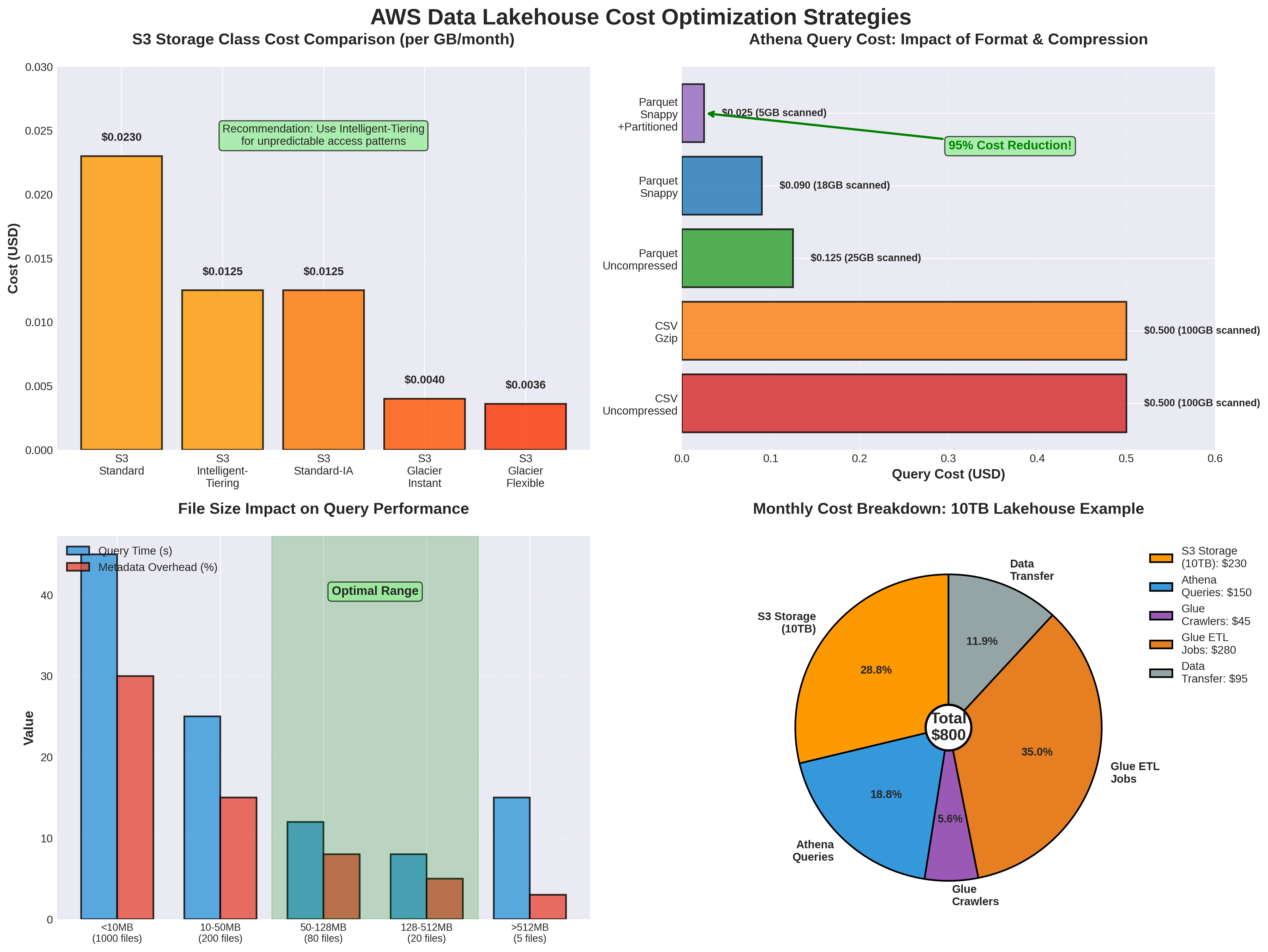
7.1. S3 Cost Optimization
7.1.1. Storage Class Optimization
S3 cung cấp nhiều storage classes với different cost và performance characteristics. Sử dụng lifecycle policies để automatically transition data sang cheaper storage classes 23.
S3 Storage Classes:
| Storage Class | Use Case | Cost (per GB/month) | Retrieval Cost |
|---|---|---|---|
| S3 Standard | Frequently accessed data | $0.023 | None |
| S3 Standard-IA | Infrequently accessed (>30 days) | $0.0125 | $0.01 per GB |
| S3 Glacier Instant Retrieval | Archive với instant access | $0.004 | $0.03 per GB |
| S3 Glacier Flexible Retrieval | Archive (minutes-hours retrieval) | $0.0036 | $0.02-0.03 per GB |
| S3 Glacier Deep Archive | Long-term archive (12+ hours) | $0.00099 | $0.02 per GB |
Lifecycle Policy Example:
# s3_lifecycle.tf
resource "aws_s3_bucket_lifecycle_configuration" "lakehouse_optimization" {
  bucket = aws_s3_bucket.lakehouse.id

  rule {
    id     = "raw-zone-lifecycle"
    status = "Enabled"

    filter {
      prefix = "raw/"
    }

    # Transition to IA after 30 days
    transition {
      days          = 30
      storage_class = "STANDARD_IA"
    }

    # Transition to Glacier after 90 days
    transition {
      days          = 90
      storage_class = "GLACIER_IR"
    }

    # Transition to Deep Archive after 365 days
    transition {
      days          = 365
      storage_class = "DEEP_ARCHIVE"
    }
  }

  rule {
    id     = "processed-zone-lifecycle"
    status = "Enabled"

    filter {
      prefix = "processed/"
    }

    # Keep processed data in Standard for 90 days
    transition {
      days          = 90
      storage_class = "STANDARD_IA"
    }

    # Archive old processed data
    transition {
      days          = 180
      storage_class = "GLACIER_IR"
    }
  }

  rule {
    id     = "curated-zone-lifecycle"
    status = "Enabled"

    filter {
      prefix = "curated/"
    }

    # Curated data stays in Standard longer
    transition {
      days          = 180
      storage_class = "STANDARD_IA"
    }
  }

  rule {
    id     = "cleanup-incomplete-uploads"
    status = "Enabled"

    abort_incomplete_multipart_upload {
      days_after_initiation = 7
    }
  }

  rule {
    id     = "cleanup-old-versions"
    status = "Enabled"

    noncurrent_version_transition {
      noncurrent_days = 30
      storage_class   = "STANDARD_IA"
    }

    noncurrent_version_expiration {
      noncurrent_days = 90
    }
  }
}
7.1.2. Intelligent-Tiering
S3 Intelligent-Tiering automatically moves objects between access tiers based on usage patterns.
resource "aws_s3_bucket_intelligent_tiering_configuration" "lakehouse" {
  bucket = aws_s3_bucket.lakehouse.id
  name   = "EntireBucket"

  tiering {
    access_tier = "ARCHIVE_ACCESS"
    days        = 90
  }

  tiering {
    access_tier = "DEEP_ARCHIVE_ACCESS"
    days        = 180
  }
}
7.1.3. Compression
Sử dụng compression để reduce storage costs và improve query performance 3.
Compression Comparison:
| Codec | Compression Ratio | Compression Speed | Decompression Speed | Splittable |
|---|---|---|---|---|
| Snappy | ~2x | Very Fast | Very Fast | Yes (with Parquet) |
| Gzip | ~3x | Medium | Medium | No |
| Zstd | ~3x | Fast | Fast | Yes (with Parquet) |
| LZ4 | ~2x | Very Fast | Very Fast | Yes (with Parquet) |
Recommendation: Sử dụng Snappy cho most use cases (good balance of compression và speed).
# write_with_compression.py
# Configure compression trong Spark
spark.conf.set("spark.sql.parquet.compression.codec", "snappy")

# Write data với compression
df.write \
    .format("iceberg") \
    .mode("append") \
    .option("write.parquet.compression-codec", "snappy") \
    .save("glue_catalog.lakehouse_processed.customer_events")
7.2. Athena Cost Optimization
Athena charges $5 per TB of data scanned. Reducing data scanned directly reduces costs 89.
7.2.1. Partition Pruning
Effective partitioning có thể dramatically reduce data scanned 317.
Example:
-- BAD: Full table scan
SELECT COUNT(*)
FROM lakehouse_processed.customer_events;
-- Scans: 1 TB, Cost: $5.00

-- GOOD: Partition pruning
SELECT COUNT(*)
FROM lakehouse_processed.customer_events
WHERE event_date = DATE '2024-01-15';
-- Scans: 10 GB, Cost: $0.05
7.2.2. Column Pruning
Select only columns bạn cần 8.
-- BAD: Select all columns
SELECT *
FROM lakehouse_processed.customer_events
WHERE event_date = DATE '2024-01-15';
-- Scans: 10 GB

-- GOOD: Select specific columns
SELECT event_id, customer_id, event_type
FROM lakehouse_processed.customer_events
WHERE event_date = DATE '2024-01-15';
-- Scans: 2 GB (80% reduction)
7.2.3. File Format Optimization
Columnar formats (Parquet, ORC) significantly reduce data scanned compared to row formats (JSON, CSV) 3.
Comparison:
| Format | Size | Query Performance | Athena Cost |
|---|---|---|---|
| JSON | 10 GB | Slow | $0.05 |
| CSV | 8 GB | Slow | $0.04 |
| Parquet (uncompressed) | 3 GB | Fast | $0.015 |
| Parquet (Snappy) | 1.5 GB | Fast | $0.0075 |
7.2.4. Query Result Reuse
Athena caches query results for 24 hours. Reuse results khi possible 8.
# athena_query_cache.py
import boto3
import hashlib
import json

class AthenaQueryCache:
    def __init__(self, database, output_location):
        self.athena_client = boto3.client('athena')
        self.s3_client = boto3.client('s3')
        self.database = database
        self.output_location = output_location
        self.cache = {}

    def execute_with_cache(self, query, cache_ttl_hours=24):
        """
        Execute query với caching
        """
        # Generate cache key
        cache_key = hashlib.md5(query.encode()).hexdigest()

        # Check cache
        if cache_key in self.cache:
            cached_result = self.cache[cache_key]
            if self._is_cache_valid(cached_result, cache_ttl_hours):
                print("Returning cached result")
                return cached_result['data']

        # Execute query
        print("Executing new query")
        response = self.athena_client.start_query_execution(
            QueryString=query,
            QueryExecutionContext={'Database': self.database},
            ResultConfiguration={'OutputLocation': self.output_location}
        )

        query_execution_id = response['QueryExecutionId']

        # Wait and get results
        results = self._wait_and_get_results(query_execution_id)

        # Cache results
        self.cache[cache_key] = {
            'data': results,
            'timestamp': time.time()
        }

        return results

    def _is_cache_valid(self, cached_result, ttl_hours):
        """
        Check if cached result is still valid
        """
        age_hours = (time.time() - cached_result['timestamp']) / 3600
        return age_hours < ttl_hours
7.2.5. Workgroup Configuration
Configure Athena workgroups để control costs và enforce limits 8.
# athena_workgroup.tf
resource "aws_athena_workgroup" "lakehouse" {
  name = "${var.project_name}-workgroup"

  configuration {
    enforce_workgroup_configuration    = true
    publish_cloudwatch_metrics_enabled = true

    result_configuration {
      output_location = "s3://${aws_s3_bucket.lakehouse.id}/athena-results/"

      encryption_configuration {
        encryption_option = "SSE_S3"
      }
    }

    # Set data scanned limit
    bytes_scanned_cutoff_per_query = 1099511627776  # 1 TB limit
  }

  tags = {
    Name        = "Lakehouse Workgroup"
    Environment = var.environment
  }
}

# Workgroup for development (lower limits)
resource "aws_athena_workgroup" "dev" {
  name = "${var.project_name}-dev-workgroup"

  configuration {
    enforce_workgroup_configuration    = true
    publish_cloudwatch_metrics_enabled = true

    result_configuration {
      output_location = "s3://${aws_s3_bucket.lakehouse.id}/athena-results/dev/"
    }

    # Lower limit for dev
    bytes_scanned_cutoff_per_query = 107374182400  # 100 GB limit
  }
}
7.3. Compute Cost Optimization
7.3.1. Right-Sizing Glue Jobs
Choose appropriate worker types và number of workers 18.
Glue Worker Types:
| Worker Type | vCPUs | Memory | Cost per DPU-hour | Use Case |
|---|---|---|---|---|
| G.1X | 4 | 16 GB | $0.44 | Standard ETL |
| G.2X | 8 | 32 GB | $0.88 | Memory-intensive |
| G.025X | 2 | 4 GB | $0.11 | Streaming |
# optimize_glue_job.py
def calculate_optimal_workers(input_size_gb, processing_time_target_min):
    """
    Calculate optimal number of workers cho Glue job

    Rule of thumb: 1 G.1X worker can process ~10 GB/hour
    """
    # Calculate required processing rate
    required_rate_gb_per_hour = (input_size_gb / processing_time_target_min) * 60

    # Calculate workers needed
    workers_needed = max(2, int(required_rate_gb_per_hour / 10))

    # Add 20% buffer
    workers_with_buffer = int(workers_needed * 1.2)

    return {
        'recommended_workers': workers_with_buffer,
        'worker_type': 'G.1X',
        'estimated_cost': workers_with_buffer * 0.44 * (processing_time_target_min / 60)
    }

# Example
result = calculate_optimal_workers(input_size_gb=500, processing_time_target_min=30)
print(f"Recommended configuration: {result}")
7.3.2. Auto Scaling cho EMR
Nếu sử dụng EMR, enable auto scaling để optimize costs 19.
# emr_autoscaling.tf
resource "aws_emr_cluster" "lakehouse" {
  name          = "${var.project_name}-emr-cluster"
  release_label = "emr-6.10.0"
  applications  = ["Spark", "Hadoop"]

  ec2_attributes {
    subnet_id                         = var.subnet_id
    emr_managed_master_security_group = aws_security_group.emr_master.id
    emr_managed_slave_security_group  = aws_security_group.emr_slave.id
    instance_profile                  = aws_iam_instance_profile.emr_profile.arn
  }

  master_instance_group {
    instance_type = "m5.xlarge"
  }

  core_instance_group {
    instance_type  = "m5.xlarge"
    instance_count = 2

    autoscaling_policy = jsonencode({
      Constraints = {
        MinCapacity = 2
        MaxCapacity = 10
      }
      Rules = [
        {
          Name = "ScaleOutOnYARNMemory"
          Description = "Scale out when YARN memory is high"
          Action = {
            SimpleScalingPolicyConfiguration = {
              AdjustmentType = "CHANGE_IN_CAPACITY"
              ScalingAdjustment = 2
              CoolDown = 300
            }
          }
          Trigger = {
            CloudWatchAlarmDefinition = {
              ComparisonOperator = "LESS_THAN"
              EvaluationPeriods = 1
              MetricName = "YARNMemoryAvailablePercentage"
              Namespace = "AWS/ElasticMapReduce"
              Period = 300
              Statistic = "AVERAGE"
              Threshold = 15.0
              Unit = "PERCENT"
            }
          }
        },
        {
          Name = "ScaleInOnYARNMemory"
          Description = "Scale in when YARN memory is low"
          Action = {
            SimpleScalingPolicyConfiguration = {
              AdjustmentType = "CHANGE_IN_CAPACITY"
              ScalingAdjustment = -1
              CoolDown = 300
            }
          }
          Trigger = {
            CloudWatchAlarmDefinition = {
              ComparisonOperator = "GREATER_THAN"
              EvaluationPeriods = 1
              MetricName = "YARNMemoryAvailablePercentage"
              Namespace = "AWS/ElasticMapReduce"
              Period = 300
              Statistic = "AVERAGE"
              Threshold = 75.0
              Unit = "PERCENT"
            }
          }
        }
      ]
    })
  }

  service_role = aws_iam_role.emr_service_role.arn
}
7.4. Cost Monitoring và Alerting
7.4.1. Cost Allocation Tags
# cost_allocation_tags.tf
resource "aws_s3_bucket_tagging" "lakehouse" {
  bucket = aws_s3_bucket.lakehouse.id

  tagging_rule {
    tag {
      key   = "CostCenter"
      value = "DataEngineering"
    }
    tag {
      key   = "Project"
      value = var.project_name
    }
    tag {
      key   = "Environment"
      value = var.environment
    }
    tag {
      key   = "DataZone"
      value = "Lakehouse"
    }
  }
}
7.4.2. Cost Anomaly Detection
# cost_monitoring.py
import boto3
from datetime import datetime, timedelta

def monitor_athena_costs(lookback_days=7, threshold_usd=100):
    """
    Monitor Athena query costs và alert on anomalies
    """
    ce_client = boto3.client('ce')  # Cost Explorer
    cloudwatch = boto3.client('cloudwatch')

    # Get cost data
    end_date = datetime.now().date()
    start_date = end_date - timedelta(days=lookback_days)

    response = ce_client.get_cost_and_usage(
        TimePeriod={
            'Start': start_date.strftime('%Y-%m-%d'),
            'End': end_date.strftime('%Y-%m-%d')
        },
        Granularity='DAILY',
        Metrics=['UnblendedCost'],
        Filter={
            'Dimensions': {
                'Key': 'SERVICE',
                'Values': ['Amazon Athena']
            }
        }
    )

    # Analyze costs
    daily_costs = []
    for result in response['ResultsByTime']:
        cost = float(result['Total']['UnblendedCost']['Amount'])
        daily_costs.append(cost)

        # Publish to CloudWatch
        cloudwatch.put_metric_data(
            Namespace='Lakehouse/Costs',
            MetricData=[
                {
                    'MetricName': 'AthenaDailyCost',
                    'Value': cost,
                    'Unit': 'None',
                    'Timestamp': datetime.strptime(result['TimePeriod']['Start'], '%Y-%m-%d')
                }
            ]
        )

    # Check for anomalies
    avg_cost = sum(daily_costs) / len(daily_costs)
    max_cost = max(daily_costs)

    if max_cost > threshold_usd:
        print(f"⚠️ ALERT: Daily Athena cost exceeded threshold: ${max_cost:.2f}")
        # Send SNS notification
        sns_client = boto3.client('sns')
        sns_client.publish(
            TopicArn='arn:aws:sns:us-east-1:123456789012:lakehouse-cost-alerts',
            Subject='Athena Cost Alert',
            Message=f'Daily Athena cost exceeded ${threshold_usd}: ${max_cost:.2f}'
        )

    return {
        'average_daily_cost': avg_cost,
        'max_daily_cost': max_cost,
        'total_cost': sum(daily_costs)
    }
7.4.3. Budget Alerts
# budget_alerts.tf
resource "aws_budgets_budget" "lakehouse_monthly" {
  name              = "${var.project_name}-monthly-budget"
  budget_type       = "COST"
  limit_amount      = "1000"
  limit_unit        = "USD"
  time_period_start = "2024-01-01_00:00"
  time_unit         = "MONTHLY"

  cost_filter {
    name = "TagKeyValue"
    values = [
      "Project$${var.project_name}"
    ]
  }

  notification {
    comparison_operator        = "GREATER_THAN"
    threshold                  = 80
    threshold_type            = "PERCENTAGE"
    notification_type         = "ACTUAL"
    subscriber_email_addresses = ["[email protected]"]
  }

  notification {
    comparison_operator        = "GREATER_THAN"
    threshold                  = 100
    threshold_type            = "PERCENTAGE"
    notification_type         = "ACTUAL"
    subscriber_email_addresses = ["[email protected]"]
  }

  notification {
    comparison_operator        = "GREATER_THAN"
    threshold                  = 90
    threshold_type            = "PERCENTAGE"
    notification_type         = "FORECASTED"
    subscriber_email_addresses = ["[email protected]"]
  }
}
8. Bảo Mật và Governance với Lake Formation
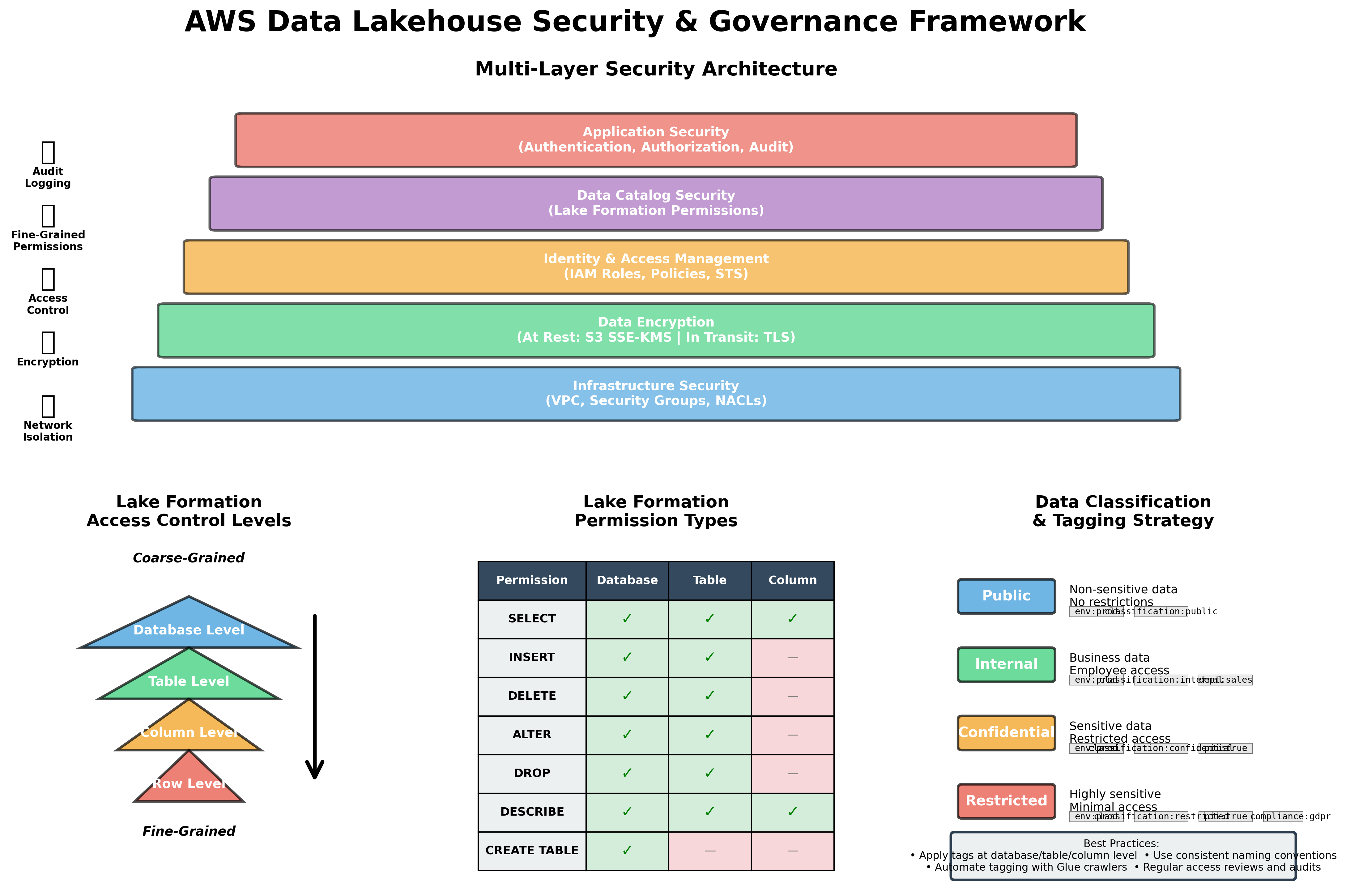
Hình 7: Multi-layer security architecture và Lake Formation access control
8.1. AWS Lake Formation Overview
AWS Lake Formation là một service giúp build, secure và manage data lakes dễ dàng hơn. Nó cung cấp centralized access control, data governance và audit capabilities 1516.
Key features:
- Fine-grained access control (column-level, row-level)
- Centralized permissions management
- Data catalog integration với Glue
- Audit logging và compliance
- Data discovery và classification
8.2. Setting Up Lake Formation
8.2.1. Enable Lake Formation
# lake_formation.tf
resource "aws_lakeformation_data_lake_settings" "main" {
  admins = [aws_iam_role.lakeformation_admin.arn]

  create_database_default_permissions {
    permissions = []
    principal   = "IAM_ALLOWED_PRINCIPALS"
  }

  create_table_default_permissions {
    permissions = []
    principal   = "IAM_ALLOWED_PRINCIPALS"
  }
}

resource "aws_iam_role" "lakeformation_admin" {
  name = "${var.project_name}-lakeformation-admin"

  assume_role_policy = jsonencode({
    Version = "2012-10-17"
    Statement = [
      {
        Action = "sts:AssumeRole"
        Effect = "Allow"
        Principal = {
          Service = "lakeformation.amazonaws.com"
        }
      }
    ]
  })
}

resource "aws_iam_role_policy_attachment" "lakeformation_admin" {
  role       = aws_iam_role.lakeformation_admin.name
  policy_arn = "arn:aws:iam::aws:policy/AWSLakeFormationDataAdmin"
}
8.2.2. Register S3 Locations
resource "aws_lakeformation_resource" "lakehouse_bucket" {
  arn = aws_s3_bucket.lakehouse.arn

  role_arn = aws_iam_role.lakeformation_admin.arn
}

# Register specific paths
resource "aws_lakeformation_resource" "processed_zone" {
  arn = "${aws_s3_bucket.lakehouse.arn}/processed"

  role_arn = aws_iam_role.lakeformation_admin.arn
}

resource "aws_lakeformation_resource" "curated_zone" {
  arn = "${aws_s3_bucket.lakehouse.arn}/curated"

  role_arn = aws_iam_role.lakeformation_admin.arn
}
8.3. Access Control Patterns
8.3.1. Database-Level Permissions
# Grant database access to data analysts
resource "aws_lakeformation_permissions" "analysts_database" {
  principal   = aws_iam_role.data_analyst.arn
  permissions = ["DESCRIBE"]

  database {
    name = aws_glue_catalog_database.processed.name
  }
}
8.3.2. Table-Level Permissions
# Grant table access với specific permissions
resource "aws_lakeformation_permissions" "analysts_table" {
  principal   = aws_iam_role.data_analyst.arn
  permissions = ["SELECT", "DESCRIBE"]

  table {
    database_name = aws_glue_catalog_database.processed.name
    name          = "customer_events"
  }
}
8.3.3. Column-Level Security
# Grant access to specific columns only
resource "aws_lakeformation_permissions" "analysts_columns" {
  principal   = aws_iam_role.data_analyst.arn
  permissions = ["SELECT"]

  table_with_columns {
    database_name = aws_glue_catalog_database.processed.name
    name          = "customer_events"

    column_names = [
      "event_id",
      "event_type",
      "event_timestamp",
      "event_date"
    ]

    # Exclude sensitive columns
    excluded_column_names = [
      "customer_id",
      "ip_address",
      "user_agent"
    ]
  }
}
8.3.4. Row-Level Security
# row_level_security.py
import boto3

def create_data_filter(database, table, filter_name, row_filter_expression):
    """
    Create row-level security filter trong Lake Formation
    """
    lakeformation = boto3.client('lakeformation')

    response = lakeformation.create_data_cells_filter(
        TableData={
            'DatabaseName': database,
            'TableCatalogId': boto3.client('sts').get_caller_identity()['Account'],
            'TableName': table,
            'Name': filter_name,
            'RowFilter': {
                'FilterExpression': row_filter_expression
            }
        }
    )

    print(f"Created data filter: {filter_name}")
    return response

# Example: Restrict analysts to only see events from their region
create_data_filter(
    database='lakehouse_processed',
    table='customer_events',
    filter_name='us_region_only',
    row_filter_expression="region = 'US'"
)

# Grant permissions với data filter
def grant_filtered_access(principal_arn, database, table, filter_name):
    """
    Grant access với row-level filter
    """
    lakeformation = boto3.client('lakeformation')

    response = lakeformation.grant_permissions(
        Principal={'DataLakePrincipalIdentifier': principal_arn},
        Resource={
            'DataCellsFilter': {
                'DatabaseName': database,
                'TableCatalogId': boto3.client('sts').get_caller_identity()['Account'],
                'TableName': table,
                'Name': filter_name
            }
        },
        Permissions=['SELECT']
    )

    print(f"Granted filtered access to {principal_arn}")
    return response
8.4. Data Governance Best Practices
8.4.1. Principle of Least Privilege
Grant minimum permissions necessary cho users và services 1516.
# least_privilege_policy.py
def create_least_privilege_policy(role_name, database, tables):
    """
    Create IAM policy với least privilege
    """
    iam = boto3.client('iam')

    policy_document = {
        "Version": "2012-10-17",
        "Statement": [
            {
                "Effect": "Allow",
                "Action": [
                    "glue:GetDatabase",
                    "glue:GetTable",
                    "glue:GetPartitions"
                ],
                "Resource": [
                    f"arn:aws:glue:*:*:catalog",
                    f"arn:aws:glue:*:*:database/{database}",
                    *[f"arn:aws:glue:*:*:table/{database}/{table}" for table in tables]
                ]
            },
            {
                "Effect": "Allow",
                "Action": [
                    "s3:GetObject",
                    "s3:ListBucket"
                ],
                "Resource": [
                    f"arn:aws:s3:::my-lakehouse-bucket/processed/{database}/*",
                    f"arn:aws:s3:::my-lakehouse-bucket/processed/{database}"
                ]
            },
            {
                "Effect": "Allow",
                "Action": [
                    "athena:StartQueryExecution",
                    "athena:GetQueryExecution",
                    "athena:GetQueryResults"
                ],
                "Resource": "*"
            }
        ]
    }

    response = iam.create_policy(
        PolicyName=f"{role_name}-least-privilege-policy",
        PolicyDocument=json.dumps(policy_document)
    )

    return response
8.4.2. Data Classification và Tagging
# data_classification.py
def classify_and_tag_table(database, table, classification_level, data_owner):
    """
    Classify và tag table cho governance
    """
    glue = boto3.client('glue')

    # Get current table
    response = glue.get_table(DatabaseName=database, Name=table)
    table_input = response['Table']

    # Add classification tags
    if 'Parameters' not in table_input:
        table_input['Parameters'] = {}

    table_input['Parameters'].update({
        'classification_level': classification_level,  # public, internal, confidential, restricted
        'data_owner': data_owner,
        'pii_data': 'true' if classification_level in ['confidential', 'restricted'] else 'false',
        'retention_period': '7_years' if classification_level == 'restricted' else '3_years',
        'last_classified': datetime.now().isoformat()
    })

    # Update table
    glue.update_table(
        DatabaseName=database,
        TableInput={
            'Name': table_input['Name'],
            'StorageDescriptor': table_input['StorageDescriptor'],
            'Parameters': table_input['Parameters']
        }
    )

    print(f"Classified {database}.{table} as {classification_level}")

# Example usage
classify_and_tag_table(
    database='lakehouse_processed',
    table='customer_events',
    classification_level='confidential',
    data_owner='data-engineering-team'
)
8.4.3. Audit Logging
# cloudtrail_logging.tf
resource "aws_cloudtrail" "lakehouse_audit" {
  name                          = "${var.project_name}-audit-trail"
  s3_bucket_name                = aws_s3_bucket.audit_logs.id
  include_global_service_events = true
  is_multi_region_trail         = true
  enable_log_file_validation    = true

  event_selector {
    read_write_type           = "All"
    include_management_events = true

    data_resource {
      type = "AWS::S3::Object"
      values = [
        "${aws_s3_bucket.lakehouse.arn}/processed/",
        "${aws_s3_bucket.lakehouse.arn}/curated/"
      ]
    }

    data_resource {
      type = "AWS::Glue::Table"
      values = ["arn:aws:glue:*:*:table/*"]
    }
  }

  event_selector {
    read_write_type           = "All"
    include_management_events = true

    data_resource {
      type = "AWS::LakeFormation::DataCells"
      values = ["arn:aws:lakeformation:*:*:datacells/*"]
    }
  }
}

resource "aws_s3_bucket" "audit_logs" {
  bucket = "${var.project_name}-audit-logs"

  lifecycle_rule {
    enabled = true

    transition {
      days          = 90
      storage_class = "GLACIER"
    }

    expiration {
      days = 2555  # 7 years
    }
  }
}
8.4.4. Compliance Monitoring
# compliance_monitoring.py
import boto3
from datetime import datetime, timedelta

def audit_access_patterns(database, lookback_days=30):
    """
    Audit data access patterns cho compliance
    """
    cloudtrail = boto3.client('cloudtrail')

    # Query CloudTrail logs
    end_time = datetime.now()
    start_time = end_time - timedelta(days=lookback_days)

    response = cloudtrail.lookup_events(
        LookupAttributes=[
            {
                'AttributeKey': 'ResourceName',
                'AttributeValue': database
            }
        ],
        StartTime=start_time,
        EndTime=end_time,
        MaxResults=1000
    )

    # Analyze access patterns
    access_summary = {}

    for event in response['Events']:
        user = event.get('Username', 'Unknown')
        event_name = event['EventName']

        if user not in access_summary:
            access_summary[user] = {}

        if event_name not in access_summary[user]:
            access_summary[user][event_name] = 0

        access_summary[user][event_name] += 1

    # Generate compliance report
    print("=== Data Access Audit Report ===")
    print(f"Database: {database}")
    print(f"Period: {start_time.date()} to {end_time.date()}")
    print("\nAccess Summary:")

    for user, events in access_summary.items():
        print(f"\nUser: {user}")
        for event_name, count in events.items():
            print(f"  {event_name}: {count} times")

    return access_summary

# Run compliance audit
audit_access_patterns('lakehouse_processed', lookback_days=30)
8.5. Data Encryption
8.5.1. Encryption at Rest
# encryption.tf
# S3 bucket encryption
resource "aws_s3_bucket_server_side_encryption_configuration" "lakehouse" {
  bucket = aws_s3_bucket.lakehouse.id

  rule {
    apply_server_side_encryption_by_default {
      sse_algorithm     = "aws:kms"
      kms_master_key_id = aws_kms_key.lakehouse.arn
    }
    bucket_key_enabled = true
  }
}

# KMS key for encryption
resource "aws_kms_key" "lakehouse" {
  description             = "KMS key for lakehouse encryption"
  deletion_window_in_days = 30
  enable_key_rotation     = true

  policy = jsonencode({
    Version = "2012-10-17"
    Statement = [
      {
        Sid    = "Enable IAM User Permissions"
        Effect = "Allow"
        Principal = {
          AWS = "arn:aws:iam::${data.aws_caller_identity.current.account_id}:root"
        }
        Action   = "kms:*"
        Resource = "*"
      },
      {
        Sid    = "Allow services to use the key"
        Effect = "Allow"
        Principal = {
          Service = [
            "s3.amazonaws.com",
            "glue.amazonaws.com",
            "athena.amazonaws.com"
          ]
        }
        Action = [
          "kms:Decrypt",
          "kms:GenerateDataKey"
        ]
        Resource = "*"
      }
    ]
  })
}

resource "aws_kms_alias" "lakehouse" {
  name          = "alias/${var.project_name}-lakehouse"
  target_key_id = aws_kms_key.lakehouse.key_id
}
8.5.2. Encryption in Transit
# Enforce HTTPS for S3 bucket
resource "aws_s3_bucket_policy" "enforce_https" {
  bucket = aws_s3_bucket.lakehouse.id

  policy = jsonencode({
    Version = "2012-10-17"
    Statement = [
      {
        Sid    = "EnforceHTTPS"
        Effect = "Deny"
        Principal = "*"
        Action = "s3:*"
        Resource = [
          "${aws_s3_bucket.lakehouse.arn}",
          "${aws_s3_bucket.lakehouse.arn}/*"
        ]
        Condition = {
          Bool = {
            "aws:SecureTransport" = "false"
          }
        }
      }
    ]
  })
}
9. Performance Tuning cho Production Workloads
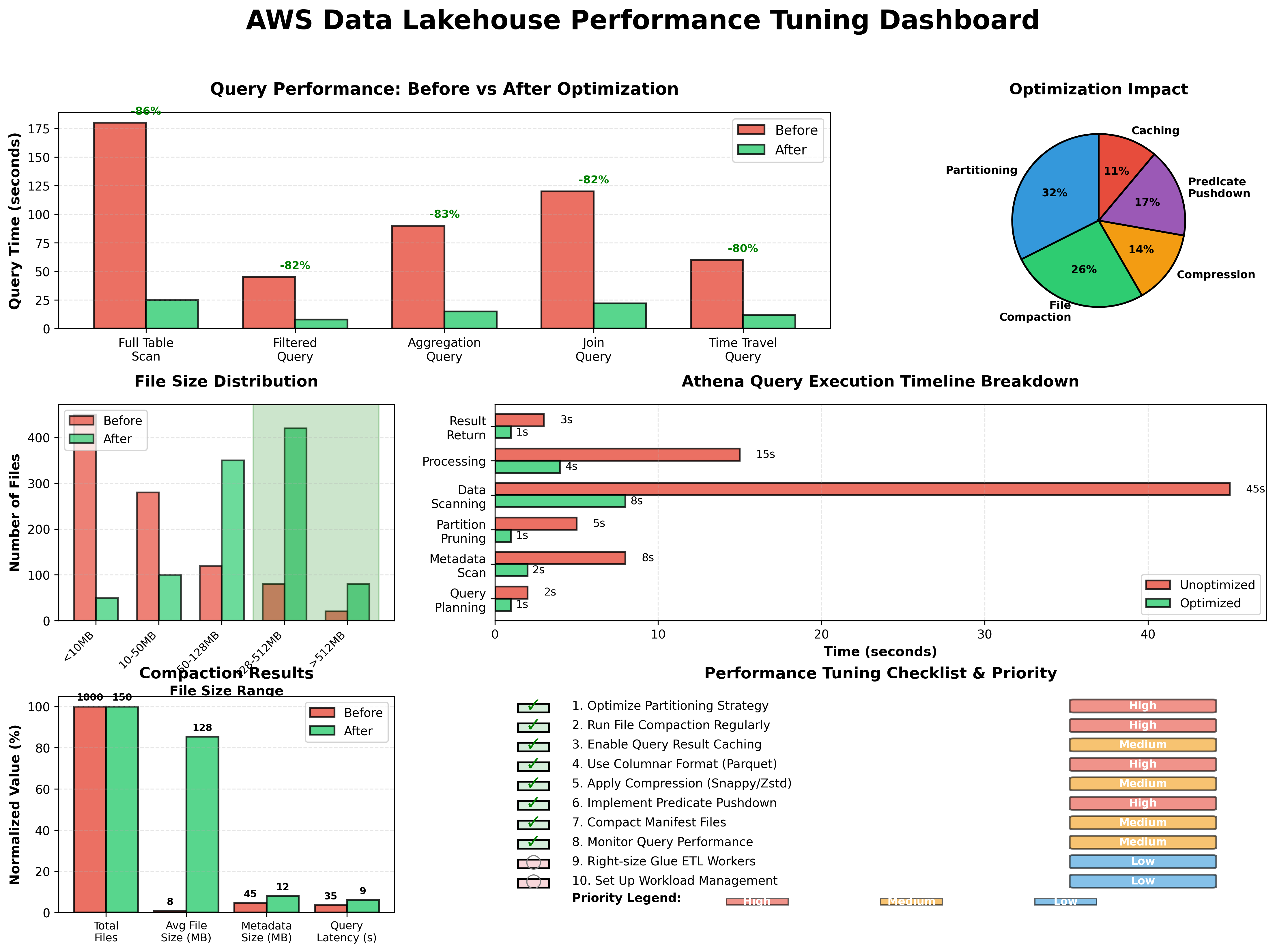
Hình 8: Performance tuning dashboard
9.1. Query Performance Optimization
9.1.1. Iceberg Metadata Optimization
Iceberg's metadata architecture enables efficient query planning và execution 324.
Key optimization techniques:
1. Manifest Caching:
# Configure manifest caching trong Spark
spark.conf.set("spark.sql.iceberg.manifest-cache.enabled", "true")
spark.conf.set("spark.sql.iceberg.manifest-cache.max-total-bytes", "104857600")  # 100MB
2. Metadata Compaction:
-- Compact manifests để reduce metadata overhead
CALL glue_catalog.system.rewrite_manifests('lakehouse_processed.customer_events');
3. Statistics Collection:
# Collect table statistics cho better query planning
spark.sql("""
    ANALYZE TABLE glue_catalog.lakehouse_processed.customer_events
    COMPUTE STATISTICS FOR ALL COLUMNS
""")
9.1.2. File Layout Optimization
Optimal file sizing:
- Target: 256MB - 1GB per file
- Avoid: Files < 100MB (too many small files)
- Avoid: Files > 2GB (memory pressure)
# file_layout_optimizer.py
def optimize_file_layout(database, table, target_file_size_mb=512):
    """
    Optimize file layout cho better query performance
    """
    spark = SparkSession.builder.getOrCreate()

    # Analyze current file distribution
    files_df = spark.sql(f"""
        SELECT
            partition,
            COUNT(*) as file_count,
            SUM(file_size_in_bytes) / 1024 / 1024 as total_size_mb,
            AVG(file_size_in_bytes) / 1024 / 1024 as avg_file_size_mb,
            MIN(file_size_in_bytes) / 1024 / 1024 as min_file_size_mb,
            MAX(file_size_in_bytes) / 1024 / 1024 as max_file_size_mb
        FROM {database}.{table}.files
        GROUP BY partition
        ORDER BY file_count DESC
    """)

    print("Current file distribution:")
    files_df.show(20, truncate=False)

    # Identify partitions needing optimization
    partitions_to_optimize = files_df.filter(
        (files_df.avg_file_size_mb < target_file_size_mb / 2) |
        (files_df.file_count > 100)
    ).collect()

    if not partitions_to_optimize:
        print("No optimization needed")
        return

    print(f"\nOptimizing {len(partitions_to_optimize)} partitions...")

    # Rewrite data files for each partition
    for partition in partitions_to_optimize:
        print(f"Optimizing partition: {partition.partition}")

        spark.sql(f"""
            CALL glue_catalog.system.rewrite_data_files(
                table => '{database}.{table}',
                where => '{partition.partition}',
                options => map(
                    'target-file-size-bytes', '{target_file_size_mb * 1024 * 1024}',
                    'min-file-size-bytes', '10485760'
                )
            )
        """)

    print("Optimization completed")

# Run optimization
optimize_file_layout('lakehouse_processed', 'customer_events', target_file_size_mb=512)
9.1.3. Partition Pruning Effectiveness
# partition_pruning_analyzer.py
def analyze_partition_pruning(database, table, query):
    """
    Analyze partition pruning effectiveness
    """
    spark = SparkSession.builder.getOrCreate()

    # Get total partitions
    total_partitions = spark.sql(f"""
        SELECT COUNT(DISTINCT partition) as count
        FROM {database}.{table}.files
    """).collect()[0]['count']

    # Execute query và get query plan
    df = spark.sql(query)
    plan = df._jdf.queryExecution().executedPlan().toString()

    # Extract partition filters from plan
    # (This is simplified - actual implementation would parse the plan)
    print("Query Plan:")
    print(plan)

    # Get actual partitions scanned
    scanned_files = spark.sql(f"""
        SELECT COUNT(DISTINCT partition) as count
        FROM {database}.{table}.files
        WHERE partition IN (
            SELECT DISTINCT partition
            FROM {database}.{table}.files
            -- Add partition filter logic here
        )
    """).collect()[0]['count']

    pruning_effectiveness = (1 - scanned_files / total_partitions) * 100

    print(f"\nPartition Pruning Analysis:")
    print(f"Total partitions: {total_partitions}")
    print(f"Partitions scanned: {scanned_files}")
    print(f"Pruning effectiveness: {pruning_effectiveness:.2f}%")

    return {
        'total_partitions': total_partitions,
        'scanned_partitions': scanned_files,
        'pruning_effectiveness_pct': pruning_effectiveness
    }
9.2. Write Performance Optimization
9.2.1. Batch Size Tuning
# batch_write_optimizer.py
def optimize_batch_writes(source_df, database, table, batch_size_mb=512):
    """
    Optimize batch writes cho Iceberg tables
    """
    spark = SparkSession.builder.getOrCreate()

    # Configure write settings
    spark.conf.set("spark.sql.files.maxRecordsPerFile", "0")  # Disable record limit
    spark.conf.set("spark.sql.files.maxPartitionBytes", f"{batch_size_mb * 1024 * 1024}")

    # Repartition data for optimal file sizes
    # Estimate number of partitions needed
    source_size_mb = source_df.rdd.map(lambda x: len(str(x))).sum() / 1024 / 1024
    num_partitions = max(1, int(source_size_mb / batch_size_mb))

    print(f"Source data size: {source_size_mb:.2f} MB")
    print(f"Target partitions: {num_partitions}")

    # Repartition và write
    source_df.repartition(num_partitions) \
        .writeTo(f"glue_catalog.{database}.{table}") \
        .using("iceberg") \
        .tableProperty("write.parquet.compression-codec", "snappy") \
        .tableProperty("write.metadata.compression-codec", "gzip") \
        .append()

    print("Write completed")
9.2.2. Concurrent Writes
Iceberg hỗ trợ concurrent writes với optimistic concurrency control 35.
# concurrent_writes.py
from concurrent.futures import ThreadPoolExecutor, as_completed

def write_partition_batch(partition_data, database, table):
    """
    Write a single partition batch
    """
    spark = SparkSession.builder.getOrCreate()

    try:
        partition_data.writeTo(f"glue_catalog.{database}.{table}") \
            .using("iceberg") \
            .append()

        return {"status": "success", "partition": partition_data}
    except Exception as e:
        return {"status": "failed", "error": str(e)}

def parallel_write(source_df, database, table, num_workers=4):
    """
    Write data in parallel using multiple workers
    """
    # Split data into batches
    partitions = source_df.randomSplit([1.0] * num_workers)

    # Execute writes in parallel
    with ThreadPoolExecutor(max_workers=num_workers) as executor:
        futures = [
            executor.submit(write_partition_batch, partition, database, table)
            for partition in partitions
        ]

        results = []
        for future in as_completed(futures):
            result = future.result()
            results.append(result)
            print(f"Write result: {result['status']}")

    # Check for failures
    failures = [r for r in results if r['status'] == 'failed']
    if failures:
        print(f"⚠️ {len(failures)} writes failed")
        for failure in failures:
            print(f"Error: {failure['error']}")
    else:
        print("✓ All writes completed successfully")

    return results
9.2.3. Write Commit Optimization
# Configure commit settings
spark.conf.set("spark.sql.iceberg.commit.retry.num-retries", "5")
spark.conf.set("spark.sql.iceberg.commit.retry.min-wait-ms", "100")
spark.conf.set("spark.sql.iceberg.commit.retry.max-wait-ms", "5000")
9.3. Athena Performance Tuning
9.3.1. Query Result Caching
# athena_cache_manager.py
class AthenaResultCache:
    def __init__(self, cache_bucket, cache_ttl_hours=24):
        self.s3_client = boto3.client('s3')
        self.cache_bucket = cache_bucket
        self.cache_ttl_hours = cache_ttl_hours

    def get_cache_key(self, query):
        """Generate cache key from query"""
        return hashlib.sha256(query.encode()).hexdigest()

    def is_cached(self, query):
        """Check if query result is cached và still valid"""
        cache_key = self.get_cache_key(query)
        cache_path = f"cache/{cache_key}/metadata.json"

        try:
            response = self.s3_client.get_object(
                Bucket=self.cache_bucket,
                Key=cache_path
            )

            metadata = json.loads(response['Body'].read())
            cache_time = datetime.fromisoformat(metadata['timestamp'])
            age_hours = (datetime.now() - cache_time).total_seconds() / 3600

            return age_hours < self.cache_ttl_hours
        except:
            return False

    def get_cached_result(self, query):
        """Retrieve cached query result"""
        cache_key = self.get_cache_key(query)
        result_path = f"cache/{cache_key}/result.csv"

        response = self.s3_client.get_object(
            Bucket=self.cache_bucket,
            Key=result_path
        )

        return pd.read_csv(response['Body'])

    def cache_result(self, query, result_df):
        """Cache query result"""
        cache_key = self.get_cache_key(query)

        # Save result
        result_path = f"cache/{cache_key}/result.csv"
        csv_buffer = result_df.to_csv(index=False)
        self.s3_client.put_object(
            Bucket=self.cache_bucket,
            Key=result_path,
            Body=csv_buffer
        )

        # Save metadata
        metadata_path = f"cache/{cache_key}/metadata.json"
        metadata = {
            'timestamp': datetime.now().isoformat(),
            'query': query,
            'row_count': len(result_df)
        }
        self.s3_client.put_object(
            Bucket=self.cache_bucket,
            Key=metadata_path,
            Body=json.dumps(metadata)
        )
9.3.2. Workload Management
# athena_workload_manager.py
class AthenaWorkloadManager:
    def __init__(self):
        self.athena_client = boto3.client('athena')
        self.workgroups = {
            'interactive': 'lakehouse-interactive-workgroup',
            'batch': 'lakehouse-batch-workgroup',
            'reporting': 'lakehouse-reporting-workgroup'
        }

    def route_query(self, query, workload_type='interactive'):
        """
        Route query to appropriate workgroup based on workload type
        """
        workgroup = self.workgroups.get(workload_type, 'lakehouse-interactive-workgroup')

        response = self.athena_client.start_query_execution(
            QueryString=query,
            WorkGroup=workgroup,
            ResultConfiguration={
                'OutputLocation': f's3://my-lakehouse-bucket/athena-results/{workload_type}/'
            }
        )

        return response['QueryExecutionId']

    def get_workload_metrics(self, workgroup, lookback_hours=24):
        """
        Get workload metrics for a workgroup
        """
        cloudwatch = boto3.client('cloudwatch')

        end_time = datetime.now()
        start_time = end_time - timedelta(hours=lookback_hours)

        metrics = cloudwatch.get_metric_statistics(
            Namespace='AWS/Athena',
            MetricName='DataScannedInBytes',
            Dimensions=[
                {'Name': 'WorkGroup', 'Value': workgroup}
            ],
            StartTime=start_time,
            EndTime=end_time,
            Period=3600,  # 1 hour
            Statistics=['Sum', 'Average', 'Maximum']
        )

        return metrics
9.4. Monitoring và Alerting
9.4.1. Performance Metrics Dashboard
# performance_dashboard.py
import boto3
from datetime import datetime, timedelta

def create_performance_dashboard():
    """
    Create CloudWatch dashboard cho lakehouse performance monitoring
    """
    cloudwatch = boto3.client('cloudwatch')

    dashboard_body = {
        "widgets": [
            {
                "type": "metric",
                "properties": {
                    "metrics": [
                        ["Lakehouse/Performance", "QueryExecutionTime", {"stat": "Average"}],
                        [".", ".", {"stat": "p99"}]
                    ],
                    "period": 300,
                    "stat": "Average",
                    "region": "us-east-1",
                    "title": "Query Execution Time",
                    "yAxis": {"left": {"label": "Seconds"}}
                }
            },
            {
                "type": "metric",
                "properties": {
                    "metrics": [
                        ["AWS/Athena", "DataScannedInBytes", {"stat": "Sum"}]
                    ],
                    "period": 3600,
                    "stat": "Sum",
                    "region": "us-east-1",
                    "title": "Data Scanned (Athena)",
                    "yAxis": {"left": {"label": "Bytes"}}
                }
            },
            {
                "type": "metric",
                "properties": {
                    "metrics": [
                        ["Lakehouse/Metadata", "SnapshotCount"],
                        [".", "DataFileCount"],
                        [".", "AverageFileSize"]
                    ],
                    "period": 3600,
                    "stat": "Average",
                    "region": "us-east-1",
                    "title": "Metadata Health"
                }
            },
            {
                "type": "metric",
                "properties": {
                    "metrics": [
                        ["AWS/Glue", "glue.driver.aggregate.numCompletedTasks"],
                        [".", "glue.driver.aggregate.numFailedTasks"]
                    ],
                    "period": 300,
                    "stat": "Sum",
                    "region": "us-east-1",
                    "title": "Glue Job Performance"
                }
            }
        ]
    }

    response = cloudwatch.put_dashboard(
        DashboardName='LakehousePerformance',
        DashboardBody=json.dumps(dashboard_body)
    )

    print("Dashboard created successfully")
    return response
9.4.2. Performance Alerts
# performance_alerts.tf
resource "aws_cloudwatch_metric_alarm" "slow_queries" {
  alarm_name          = "${var.project_name}-slow-queries"
  comparison_operator = "GreaterThanThreshold"
  evaluation_periods  = "2"
  metric_name         = "EngineExecutionTime"
  namespace           = "AWS/Athena"
  period              = "300"
  statistic           = "Average"
  threshold           = "60000"  # 60 seconds
  alarm_description   = "Alert when average query time exceeds 60 seconds"
  alarm_actions       = [aws_sns_topic.alerts.arn]

  dimensions = {
    WorkGroup = aws_athena_workgroup.lakehouse.name
  }
}

resource "aws_cloudwatch_metric_alarm" "high_data_scan" {
  alarm_name          = "${var.project_name}-high-data-scan"
  comparison_operator = "GreaterThanThreshold"
  evaluation_periods  = "1"
  metric_name         = "DataScannedInBytes"
  namespace           = "AWS/Athena"
  period              = "3600"
  statistic           = "Sum"
  threshold           = "1099511627776"  # 1 TB
  alarm_description   = "Alert when hourly data scanned exceeds 1 TB"
  alarm_actions       = [aws_sns_topic.alerts.arn]

  dimensions = {
    WorkGroup = aws_athena_workgroup.lakehouse.name
  }
}

resource "aws_cloudwatch_metric_alarm" "metadata_bloat" {
  alarm_name          = "${var.project_name}-metadata-bloat"
  comparison_operator = "GreaterThanThreshold"
  evaluation_periods  = "1"
  metric_name         = "SnapshotCount"
  namespace           = "Lakehouse/Metadata"
  period              = "3600"
  statistic           = "Average"
  threshold           = "100"
  alarm_description   = "Alert when snapshot count exceeds 100"
  alarm_actions       = [aws_sns_topic.alerts.arn]
}

resource "aws_sns_topic" "alerts" {
  name = "${var.project_name}-performance-alerts"
}

resource "aws_sns_topic_subscription" "email" {
  topic_arn = aws_sns_topic.alerts.arn
  protocol  = "email"
  endpoint  = "[email protected]"
}
10. Cân Nhắc Thực Tế cho Production
10.1. Initial Priorities cho Production Readiness
Khi deploy data lakehouse lên production, có một số priorities quan trọng cần establish ngay từ đầu 36, 25:
10.1.1. Establish Catalog và Snapshot Ownership
Treat Iceberg snapshots trên S3 như canonical table state và use Glue cho discovery và role-based access 36.
# catalog_ownership.py
def establish_catalog_ownership():
    """
    Document và enforce catalog ownership policies
    """
    ownership_policy = {
        "iceberg_snapshots": {
            "owner": "data-engineering-team",
            "location": "s3://my-lakehouse-bucket/*/metadata/",
            "responsibility": "Source of truth for table state and history",
            "backup_frequency": "daily",
            "retention_policy": "7 days recent + monthly milestones"
        },
        "glue_catalog": {
            "owner": "data-engineering-team",
            "responsibility": "Discovery and access control layer",
            "sync_frequency": "real-time",
            "validation": "automated consistency checks"
        }
    }

    # Store policy document
    s3_client = boto3.client('s3')
    s3_client.put_object(
        Bucket='my-lakehouse-bucket',
        Key='governance/catalog-ownership-policy.json',
        Body=json.dumps(ownership_policy, indent=2)
    )

    print("Catalog ownership policy established")
    return ownership_policy
10.1.2. Automate Maintenance Tasks
Schedule compaction, manifest consolidation và metadata cleanup jobs từ outset để prevent small-file và metadata bloat 322.
# maintenance_scheduler.py
def setup_maintenance_schedule():
    """
    Setup automated maintenance schedule cho production lakehouse
    """
    maintenance_tasks = {
        "daily": [
            {
                "name": "expire_old_snapshots",
                "schedule": "cron(0 2 * * ? *)",  # 2 AM daily
                "retention_days": 7,
                "tables": ["customer_events", "transactions", "user_activities"]
            },
            {
                "name": "remove_orphan_files",
                "schedule": "cron(0 3 * * ? *)",  # 3 AM daily
                "older_than_days": 7,
                "tables": ["customer_events", "transactions", "user_activities"]
            }
        ],
        "weekly": [
            {
                "name": "rewrite_manifests",
                "schedule": "cron(0 1 ? * SUN *)",  # 1 AM Sunday
                "tables": ["customer_events", "transactions", "user_activities"]
            },
            {
                "name": "compact_data_files",
                "schedule": "cron(0 2 ? * SUN *)",  # 2 AM Sunday
                "target_file_size_mb": 512,
                "tables": ["customer_events", "transactions"]
            }
        ],
        "monthly": [
            {
                "name": "full_table_optimization",
                "schedule": "cron(0 0 1 * ? *)",  # 1st of month
                "tasks": ["rewrite_manifests", "compact_files", "update_statistics"],
                "tables": ["customer_events", "transactions", "user_activities"]
            }
        ]
    }

    # Create EventBridge rules for each task
    events_client = boto3.client('events')

    for frequency, tasks in maintenance_tasks.items():
        for task in tasks:
            rule_name = f"lakehouse-maintenance-{task['name']}"

            events_client.put_rule(
                Name=rule_name,
                ScheduleExpression=task['schedule'],
                State='ENABLED',
                Description=f"Automated {task['name']} maintenance task"
            )

            print(f"Created maintenance rule: {rule_name}")

    return maintenance_tasks
10.1.3. Implement Governance Early
Integrate Lake Formation hoặc Glue access control policies và log access to S3 và catalog operations cho auditability 1516.
# governance_setup.py
def setup_production_governance():
    """
    Setup governance framework cho production lakehouse
    """
    governance_config = {
        "access_control": {
            "method": "lake_formation",
            "default_policy": "deny_all",
            "role_based_access": True,
            "column_level_security": True,
            "row_level_security": True
        },
        "audit_logging": {
            "cloudtrail_enabled": True,
            "log_data_access": True,
            "log_metadata_changes": True,
            "retention_days": 2555  # 7 years
        },
        "data_classification": {
            "auto_classify": True,
            "pii_detection": True,
            "sensitivity_levels": ["public", "internal", "confidential", "restricted"]
        },
        "compliance": {
            "frameworks": ["GDPR", "CCPA", "SOC2"],
            "data_retention_policies": True,
            "right_to_be_forgotten": True
        }
    }

    # Enable CloudTrail logging
    cloudtrail = boto3.client('cloudtrail')
    cloudtrail.create_trail(
        Name='lakehouse-audit-trail',
        S3BucketName='my-lakehouse-audit-logs',
        IncludeGlobalServiceEvents=True,
        IsMultiRegionTrail=True,
        EnableLogFileValidation=True
    )

    cloudtrail.start_logging(Name='lakehouse-audit-trail')

    print("Production governance framework established")
    return governance_config
10.2. Data Quality Framework
10.2.1. Data Quality Checks
# data_quality.py
from pyspark.sql import SparkSession
from pyspark.sql.functions import col, count, when, isnan, isnull

class DataQualityChecker:
    def __init__(self, spark):
        self.spark = spark
        self.quality_results = []

    def check_completeness(self, df, required_columns):
        """
        Check completeness of required columns
        """
        total_rows = df.count()

        for column in required_columns:
            null_count = df.filter(col(column).isNull()).count()
            completeness_pct = ((total_rows - null_count) / total_rows) * 100

            result = {
                'check_type': 'completeness',
                'column': column,
                'total_rows': total_rows,
                'null_count': null_count,
                'completeness_pct': completeness_pct,
                'passed': completeness_pct >= 95  # 95% threshold
            }

            self.quality_results.append(result)

            if not result['passed']:
                print(f"⚠️ Completeness check failed for {column}: {completeness_pct:.2f}%")

        return self.quality_results

    def check_uniqueness(self, df, unique_columns):
        """
        Check uniqueness of specified columns
        """
        total_rows = df.count()

        for column in unique_columns:
            distinct_count = df.select(column).distinct().count()
            uniqueness_pct = (distinct_count / total_rows) * 100

            result = {
                'check_type': 'uniqueness',
                'column': column,
                'total_rows': total_rows,
                'distinct_count': distinct_count,
                'uniqueness_pct': uniqueness_pct,
                'passed': uniqueness_pct >= 99  # 99% threshold for unique columns
            }

            self.quality_results.append(result)

            if not result['passed']:
                print(f"⚠️ Uniqueness check failed for {column}: {uniqueness_pct:.2f}%")

        return self.quality_results

    def check_validity(self, df, validity_rules):
        """
        Check validity based on custom rules

        validity_rules = {
            'column_name': 'validation_expression'
        }
        """
        total_rows = df.count()

        for column, rule in validity_rules.items():
            valid_count = df.filter(rule).count()
            validity_pct = (valid_count / total_rows) * 100

            result = {
                'check_type': 'validity',
                'column': column,
                'rule': rule,
                'total_rows': total_rows,
                'valid_count': valid_count,
                'validity_pct': validity_pct,
                'passed': validity_pct >= 95
            }

            self.quality_results.append(result)

            if not result['passed']:
                print(f"⚠️ Validity check failed for {column}: {validity_pct:.2f}%")

        return self.quality_results

    def generate_quality_report(self):
        """
        Generate comprehensive quality report
        """
        passed_checks = sum(1 for r in self.quality_results if r['passed'])
        total_checks = len(self.quality_results)
        overall_quality_score = (passed_checks / total_checks) * 100 if total_checks > 0 else 0

        report = {
            'timestamp': datetime.now().isoformat(),
            'total_checks': total_checks,
            'passed_checks': passed_checks,
            'failed_checks': total_checks - passed_checks,
            'overall_quality_score': overall_quality_score,
            'detailed_results': self.quality_results
        }

        return report

# Usage example
spark = SparkSession.builder.getOrCreate()
df = spark.table("glue_catalog.lakehouse_processed.customer_events")

checker = DataQualityChecker(spark)

# Run checks
checker.check_completeness(df, ['event_id', 'customer_id', 'event_timestamp'])
checker.check_uniqueness(df, ['event_id'])
checker.check_validity(df, {
    'event_timestamp': "event_timestamp >= '2020-01-01'",
    'customer_id': "LENGTH(customer_id) > 0"
})

# Generate report
quality_report = checker.generate_quality_report()
print(json.dumps(quality_report, indent=2))
10.2.2. Automated Quality Gates
# quality_gates.py
class QualityGate:
    def __init__(self, min_quality_score=90):
        self.min_quality_score = min_quality_score

    def evaluate(self, quality_report):
        """
        Evaluate quality report against gates
        """
        score = quality_report['overall_quality_score']

        if score >= self.min_quality_score:
            print(f"✓ Quality gate passed: {score:.2f}%")
            return True
        else:
            print(f"✗ Quality gate failed: {score:.2f}% (minimum: {self.min_quality_score}%)")

            # Log failed checks
            failed_checks = [r for r in quality_report['detailed_results'] if not r['passed']]
            print(f"\nFailed checks ({len(failed_checks)}):")
            for check in failed_checks:
                print(f"  - {check['check_type']} on {check['column']}")

            return False

    def block_or_alert(self, quality_report, action='alert'):
        """
        Block pipeline hoặc send alert based on quality gate result
        """
        passed = self.evaluate(quality_report)

        if not passed:
            if action == 'block':
                raise Exception("Quality gate failed - blocking pipeline")
            elif action == 'alert':
                # Send SNS notification
                sns_client = boto3.client('sns')
                sns_client.publish(
                    TopicArn='arn:aws:sns:us-east-1:123456789012:data-quality-alerts',
                    Subject='Data Quality Gate Failed',
                    Message=json.dumps(quality_report, indent=2)
                )
                print("Alert sent to data quality team")

        return passed

# Usage in ETL pipeline
quality_gate = QualityGate(min_quality_score=90)
passed = quality_gate.block_or_alert(quality_report, action='alert')

if not passed:
    # Handle quality failure
    print("Proceeding with caution - quality issues detected")
10.3. Disaster Recovery và Backup
10.3.1. Backup Strategy
# backup_strategy.py
class LakehouseBackupManager:
    def __init__(self, source_bucket, backup_bucket):
        self.s3_client = boto3.client('s3')
        self.source_bucket = source_bucket
        self.backup_bucket = backup_bucket

    def backup_metadata(self, table_paths):
        """
        Backup Iceberg metadata files
        """
        backup_timestamp = datetime.now().strftime('%Y%m%d_%H%M%S')

        for table_path in table_paths:
            metadata_prefix = f"{table_path}/metadata/"

            # List metadata files
            paginator = self.s3_client.get_paginator('list_objects_v2')
            pages = paginator.paginate(
                Bucket=self.source_bucket,
                Prefix=metadata_prefix
            )

            for page in pages:
                if 'Contents' not in page:
                    continue

                for obj in page['Contents']:
                    source_key = obj['Key']
                    backup_key = f"backups/{backup_timestamp}/{source_key}"

                    # Copy to backup bucket
                    self.s3_client.copy_object(
                        CopySource={'Bucket': self.source_bucket, 'Key': source_key},
                        Bucket=self.backup_bucket,
                        Key=backup_key
                    )

            print(f"Backed up metadata for {table_path}")

    def backup_glue_catalog(self, database_names):
        """
        Backup Glue catalog definitions
        """
        glue_client = boto3.client('glue')
        backup_timestamp = datetime.now().strftime('%Y%m%d_%H%M%S')

        catalog_backup = {
            'timestamp': backup_timestamp,
            'databases': {}
        }

        for database_name in database_names:
            # Get database
            db_response = glue_client.get_database(Name=database_name)
            catalog_backup['databases'][database_name] = {
                'database': db_response['Database'],
                'tables': {}
            }

            # Get tables
            tables_response = glue_client.get_tables(DatabaseName=database_name)

            for table in tables_response['TableList']:
                table_name = table['Name']
                catalog_backup['databases'][database_name]['tables'][table_name] = table

        # Save backup
        backup_key = f"catalog-backups/{backup_timestamp}/glue-catalog.json"
        self.s3_client.put_object(
            Bucket=self.backup_bucket,
            Key=backup_key,
            Body=json.dumps(catalog_backup, indent=2, default=str)
        )

        print(f"Backed up Glue catalog to {backup_key}")
        return catalog_backup

    def restore_from_backup(self, backup_timestamp, table_path):
        """
        Restore table metadata from backup
        """
        backup_prefix = f"backups/{backup_timestamp}/{table_path}/metadata/"

        # List backup files
        response = self.s3_client.list_objects_v2(
            Bucket=self.backup_bucket,
            Prefix=backup_prefix
        )

        if 'Contents' not in response:
            print(f"No backup found for timestamp {backup_timestamp}")
            return False

        # Restore files
        for obj in response['Contents']:
            backup_key = obj['Key']
            restore_key = backup_key.replace(f"backups/{backup_timestamp}/", "")

            self.s3_client.copy_object(
                CopySource={'Bucket': self.backup_bucket, 'Key': backup_key},
                Bucket=self.source_bucket,
                Key=restore_key
            )

        print(f"Restored metadata for {table_path} from backup {backup_timestamp}")
        return True

# Setup automated backups
backup_manager = LakehouseBackupManager(
    source_bucket='my-lakehouse-bucket',
    backup_bucket='my-lakehouse-backup-bucket'
)

# Backup critical tables
backup_manager.backup_metadata([
    'processed/customer_events',
    'processed/transactions',
    'curated/analytics'
])

backup_manager.backup_glue_catalog([
    'lakehouse_processed',
    'lakehouse_curated'
])
10.3.2. Cross-Region Replication
# cross_region_replication.tf
resource "aws_s3_bucket_replication_configuration" "lakehouse" {
  bucket = aws_s3_bucket.lakehouse.id
  role   = aws_iam_role.replication.arn

  rule {
    id     = "replicate-critical-data"
    status = "Enabled"

    filter {
      prefix = "processed/"
    }

    destination {
      bucket        = aws_s3_bucket.lakehouse_replica.arn
      storage_class = "STANDARD_IA"

      replication_time {
        status = "Enabled"
        time {
          minutes = 15
        }
      }

      metrics {
        status = "Enabled"
        event_threshold {
          minutes = 15
        }
      }
    }

    delete_marker_replication {
      status = "Enabled"
    }
  }
}

# Replica bucket in different region
resource "aws_s3_bucket" "lakehouse_replica" {
  provider = aws.replica_region
  bucket   = "${var.project_name}-lakehouse-replica"

  versioning {
    enabled = true
  }
}
10.4. Migration Patterns
10.4.1. Migration từ Traditional Data Warehouse
# warehouse_migration.py
class WarehouseMigration:
    def __init__(self, source_connection, target_database):
        self.source_conn = source_connection
        self.target_database = target_database
        self.spark = SparkSession.builder.getOrCreate()

    def migrate_table(self, source_table, target_table, partition_column=None):
        """
        Migrate table từ warehouse to lakehouse
        """
        print(f"Migrating {source_table} to {target_table}...")

        # Step 1: Extract schema
        source_df = self.spark.read \
            .format("jdbc") \
            .option("url", self.source_conn) \
            .option("dbtable", source_table) \
            .option("numPartitions", "10") \
            .load()

        print(f"Source schema: {source_df.schema}")

        # Step 2: Create target Iceberg table
        if partition_column:
            partition_spec = f"PARTITIONED BY (days({partition_column}))"
        else:
            partition_spec = ""

        create_table_sql = f"""
            CREATE TABLE IF NOT EXISTS glue_catalog.{self.target_database}.{target_table}
            USING iceberg
            {partition_spec}
            AS SELECT * FROM source_df LIMIT 0
        """

        self.spark.sql(create_table_sql)

        # Step 3: Migrate data in batches
        total_rows = source_df.count()
        batch_size = 1000000  # 1M rows per batch
        num_batches = (total_rows // batch_size) + 1

        print(f"Migrating {total_rows} rows in {num_batches} batches...")

        for i in range(num_batches):
            offset = i * batch_size
            batch_df = source_df.limit(batch_size).offset(offset)

            batch_df.writeTo(f"glue_catalog.{self.target_database}.{target_table}") \
                .using("iceberg") \
                .append()

            print(f"Batch {i+1}/{num_batches} completed")

        # Step 4: Validate migration
        target_count = self.spark.table(f"glue_catalog.{self.target_database}.{target_table}").count()

        if target_count == total_rows:
            print(f"✓ Migration successful: {total_rows} rows migrated")
            return True
        else:
            print(f"✗ Migration validation failed: {target_count} != {total_rows}")
            return False

    def parallel_migration(self, table_list):
        """
        Migrate multiple tables in parallel
        """
        from concurrent.futures import ThreadPoolExecutor, as_completed

        with ThreadPoolExecutor(max_workers=5) as executor:
            futures = {
                executor.submit(
                    self.migrate_table,
                    table['source'],
                    table['target'],
                    table.get('partition_column')
                ): table for table in table_list
            }

            results = []
            for future in as_completed(futures):
                table = futures[future]
                try:
                    result = future.result()
                    results.append({'table': table['target'], 'success': result})
                except Exception as e:
                    print(f"Migration failed for {table['target']}: {str(e)}")
                    results.append({'table': table['target'], 'success': False, 'error': str(e)})

        return results

# Usage
migration = WarehouseMigration(
    source_connection="jdbc:postgresql://warehouse.example.com:5432/db",
    target_database="lakehouse_processed"
)

tables_to_migrate = [
    {'source': 'public.customer_events', 'target': 'customer_events', 'partition_column': 'event_date'},
    {'source': 'public.transactions', 'target': 'transactions', 'partition_column': 'transaction_date'},
    {'source': 'public.users', 'target': 'users'}
]

results = migration.parallel_migration(tables_to_migrate)
11. Hướng Dẫn Troubleshooting
11.1. Common Issues và Solutions
11.1.1. Query Performance Issues
Problem: Slow query execution
Symptoms:
- Queries taking longer than expected
- High data scanned in Athena
- Timeout errors
Diagnosis:
# diagnose_query_performance.py
def diagnose_slow_query(database, table, query):
    """
    Diagnose query performance issues
    """
    spark = SparkSession.builder.getOrCreate()

    # Check 1: Partition pruning effectiveness
    print("=== Partition Pruning Analysis ===")
    total_partitions = spark.sql(f"""
        SELECT COUNT(DISTINCT partition) FROM {database}.{table}.files
    """).collect()[0][0]
    print(f"Total partitions: {total_partitions}")

    # Check 2: File count và size distribution
    print("\n=== File Distribution Analysis ===")
    file_stats = spark.sql(f"""
        SELECT
            COUNT(*) as file_count,
            AVG(file_size_in_bytes) / 1024 / 1024 as avg_file_size_mb,
            MIN(file_size_in_bytes) / 1024 / 1024 as min_file_size_mb,
            MAX(file_size_in_bytes) / 1024 / 1024 as max_file_size_mb
        FROM {database}.{table}.files
    """).collect()[0]

    print(f"File count: {file_stats.file_count}")
    print(f"Average file size: {file_stats.avg_file_size_mb:.2f} MB")
    print(f"Min file size: {file_stats.min_file_size_mb:.2f} MB")
    print(f"Max file size: {file_stats.max_file_size_mb:.2f} MB")

    # Check 3: Snapshot count
    print("\n=== Metadata Health ===")
    snapshot_count = spark.sql(f"""
        SELECT COUNT(*) FROM {database}.{table}.snapshots
    """).collect()[0][0]
    print(f"Snapshot count: {snapshot_count}")

    # Recommendations
    print("\n=== Recommendations ===")
    if file_stats.file_count > 10000:
        print("⚠️ Too many files - run compaction")
    if file_stats.avg_file_size_mb < 100:
        print("⚠️ Small files detected - run compaction")
    if snapshot_count > 100:
        print("⚠️ Too many snapshots - expire old snapshots")
    if total_partitions > 1000:
        print("⚠️ High partition count - consider partition evolution")

# Run diagnosis
diagnose_slow_query('lakehouse_processed', 'customer_events',
                   "SELECT * FROM customer_events WHERE event_date = '2024-01-15'")
Solutions:
- Run file compaction:
CALL glue_catalog.system.rewrite_data_files(
    'lakehouse_processed.customer_events',
    map('target-file-size-bytes', '536870912')
);
- Expire old snapshots:
CALL system.expire_snapshots(
    table => 'lakehouse_processed.customer_events',
    older_than => TIMESTAMP '2024-01-01 00:00:00',
    retain_last => 5
);
- Optimize partition strategy:
ALTER TABLE lakehouse_processed.customer_events
SET PARTITION SPEC (days(event_date));
11.1.2. Write Conflicts
Problem: Concurrent write failures
Symptoms:
- CommitFailedException
- "Concurrent update to table" errors
Diagnosis:
# diagnose_write_conflicts.py
def diagnose_write_conflicts(database, table):
    """
    Analyze write patterns và conflicts
    """
    cloudtrail = boto3.client('cloudtrail')

    # Query recent write operations
    end_time = datetime.now()
    start_time = end_time - timedelta(hours=1)

    response = cloudtrail.lookup_events(
        LookupAttributes=[
            {
                'AttributeKey': 'ResourceName',
                'AttributeValue': f"{database}.{table}"
            }
        ],
        StartTime=start_time,
        EndTime=end_time
    )

    write_events = [e for e in response['Events']
                   if 'Write' in e['EventName'] or 'Update' in e['EventName']]

    print(f"Write operations in last hour: {len(write_events)}")

    # Group by time window
    time_windows = {}
    for event in write_events:
        window = event['EventTime'].replace(minute=0, second=0, microsecond=0)
        if window not in time_windows:
            time_windows[window] = []
        time_windows[window].append(event)

    # Identify concurrent writes
    for window, events in time_windows.items():
        if len(events) > 1:
            print(f"\n⚠️ Concurrent writes detected at {window}:")
            for event in events:
                print(f"  - {event['Username']} at {event['EventTime']}")

# Run diagnosis
diagnose_write_conflicts('lakehouse_processed', 'customer_events')
Solutions:
- Implement retry logic:
# write_with_retry.py
from tenacity import retry, stop_after_attempt, wait_exponential

@retry(
    stop=stop_after_attempt(5),
    wait=wait_exponential(multiplier=1, min=2, max=30)
)
def write_with_retry(df, database, table):
    """
    Write với automatic retry on conflicts
    """
    try:
        df.writeTo(f"glue_catalog.{database}.{table}") \
            .using("iceberg") \
            .append()
        print("Write successful")
    except Exception as e:
        if "CommitFailedException" in str(e):
            print(f"Commit conflict detected, retrying...")
            raise  # Trigger retry
        else:
            print(f"Write failed: {str(e)}")
            raise
- Coordinate writes:
# coordinated_writes.py
import redis

class WriteCoordinator:
    def __init__(self, redis_host='localhost'):
        self.redis_client = redis.Redis(host=redis_host)

    def acquire_write_lock(self, table_name, timeout=300):
        """
        Acquire distributed lock cho table writes
        """
        lock_key = f"write_lock:{table_name}"
        acquired = self.redis_client.set(lock_key, "locked", nx=True, ex=timeout)
        return acquired

    def release_write_lock(self, table_name):
        """
        Release write lock
        """
        lock_key = f"write_lock:{table_name}"
        self.redis_client.delete(lock_key)

    def coordinated_write(self, df, database, table):
        """
        Write với distributed locking
        """
        table_name = f"{database}.{table}"

        if self.acquire_write_lock(table_name):
            try:
                df.writeTo(f"glue_catalog.{table_name}") \
                    .using("iceberg") \
                    .append()
                print("Write successful")
            finally:
                self.release_write_lock(table_name)
        else:
            print("Could not acquire write lock - another write in progress")
            raise Exception("Write lock unavailable")
11.1.3. Metadata Corruption
Problem: Corrupted metadata files
Symptoms:
- "Metadata file not found" errors
- Inconsistent query results
- Table not accessible
Diagnosis:
# diagnose_metadata_corruption.py
def diagnose_metadata_corruption(database, table, bucket):
    """
    Check metadata integrity
    """
    s3_client = boto3.client('s3')

    table_path = f"processed/{table}"
    metadata_prefix = f"{table_path}/metadata/"

    # List metadata files
    response = s3_client.list_objects_v2(
        Bucket=bucket,
        Prefix=metadata_prefix
    )

    if 'Contents' not in response:
        print("⚠️ No metadata files found!")
        return False

    metadata_files = response['Contents']
    print(f"Found {len(metadata_files)} metadata files")

    # Check for metadata.json files
    metadata_json_files = [f for f in metadata_files if 'metadata.json' in f['Key']]
    print(f"Metadata JSON files: {len(metadata_json_files)}")

    # Check for manifest files
    manifest_files = [f for f in metadata_files if 'manifest' in f['Key']]
    print(f"Manifest files: {len(manifest_files)}")

    # Validate latest metadata file
    if metadata_json_files:
        latest_metadata = sorted(metadata_json_files, key=lambda x: x['LastModified'])[-1]
        print(f"\nLatest metadata file: {latest_metadata['Key']}")
        print(f"Last modified: {latest_metadata['LastModified']}")

        # Try to read metadata
        try:
            obj = s3_client.get_object(Bucket=bucket, Key=latest_metadata['Key'])
            metadata_content = json.loads(obj['Body'].read())
            print("✓ Metadata file is valid JSON")

            # Check required fields
            required_fields = ['format-version', 'table-uuid', 'current-snapshot-id']
            for field in required_fields:
                if field in metadata_content:
                    print(f"✓ {field}: {metadata_content[field]}")
                else:
                    print(f"✗ Missing field: {field}")
        except Exception as e:
            print(f"✗ Error reading metadata: {str(e)}")
            return False

    return True

# Run diagnosis
diagnose_metadata_corruption('lakehouse_processed', 'customer_events', 'my-lakehouse-bucket')
Solutions:
- Restore từ backup:
# Restore metadata từ backup (see section 10.3.1)
backup_manager.restore_from_backup('20240115_020000', 'processed/customer_events')
- Rebuild metadata từ data files:
# rebuild_metadata.py
def rebuild_table_metadata(database, table, data_location):
    """
    Rebuild Iceberg table metadata từ data files
    """
    spark = SparkSession.builder.getOrCreate()

    # Read data files directly
    df = spark.read.parquet(data_location)

    # Create new table với same schema
    temp_table = f"{table}_rebuilt"

    df.writeTo(f"glue_catalog.{database}.{temp_table}") \
        .using("iceberg") \
        .create()

    print(f"Rebuilt table as {temp_table}")
    print("Manual step: Verify data và rename table")
11.1.4. High Costs
Problem: Unexpected high AWS costs
Diagnosis:
# diagnose_high_costs.py
def diagnose_high_costs(lookback_days=7):
    """
    Analyze cost drivers
    """
    ce_client = boto3.client('ce')

    end_date = datetime.now().date()
    start_date = end_date - timedelta(days=lookback_days)

    # Get cost breakdown by service
    response = ce_client.get_cost_and_usage(
        TimePeriod={
            'Start': start_date.strftime('%Y-%m-%d'),
            'End': end_date.strftime('%Y-%m-%d')
        },
        Granularity='DAILY',
        Metrics=['UnblendedCost'],
        GroupBy=[
            {'Type': 'DIMENSION', 'Key': 'SERVICE'}
        ]
    )

    # Aggregate costs by service
    service_costs = {}
    for result in response['ResultsByTime']:
        for group in result['Groups']:
            service = group['Keys'][0]
            cost = float(group['Metrics']['UnblendedCost']['Amount'])

            if service not in service_costs:
                service_costs[service] = 0
            service_costs[service] += cost

    # Sort by cost
    sorted_costs = sorted(service_costs.items(), key=lambda x: x[1], reverse=True)

    print("=== Cost Breakdown (Last 7 Days) ===")
    total_cost = sum(service_costs.values())

    for service, cost in sorted_costs[:10]:
        percentage = (cost / total_cost) * 100
        print(f"{service}: ${cost:.2f} ({percentage:.1f}%)")

    print(f"\nTotal: ${total_cost:.2f}")

    # Specific checks
    print("\n=== Cost Optimization Opportunities ===")

    # Check Athena costs
    athena_cost = service_costs.get('Amazon Athena', 0)
    if athena_cost > 100:
        print(f"⚠️ High Athena costs: ${athena_cost:.2f}")
        print("  - Review query patterns")
        print("  - Check partition pruning")
        print("  - Implement query result caching")

    # Check S3 costs
    s3_cost = service_costs.get('Amazon Simple Storage Service', 0)
    if s3_cost > 50:
        print(f"⚠️ High S3 costs: ${s3_cost:.2f}")
        print("  - Review storage classes")
        print("  - Implement lifecycle policies")
        print("  - Check for orphan files")

    # Check Glue costs
    glue_cost = service_costs.get('AWS Glue', 0)
    if glue_cost > 200:
        print(f"⚠️ High Glue costs: ${glue_cost:.2f}")
        print("  - Review job configurations")
        print("  - Optimize worker counts")
        print("  - Check for failed jobs")

# Run diagnosis
diagnose_high_costs(lookback_days=7)
Solutions:
- Optimize Athena queries (see section 7.2)
- Implement S3 lifecycle policies (see section 7.1.1)
- Right-size Glue jobs (see section 7.3.1)
- Set up cost alerts (see section 7.4.3)
11.2. Debugging Tools
11.2.1. Iceberg Metadata Inspector
# iceberg_metadata_inspector.py
class IcebergMetadataInspector:
    def __init__(self, bucket):
        self.s3_client = boto3.client('s3')
        self.bucket = bucket

    def inspect_table(self, table_path):
        """
        Comprehensive inspection của Iceberg table metadata
        """
        metadata_prefix = f"{table_path}/metadata/"

        # Get latest metadata file
        response = self.s3_client.list_objects_v2(
            Bucket=self.bucket,
            Prefix=metadata_prefix
        )

        metadata_files = [f for f in response.get('Contents', [])
                         if 'metadata.json' in f['Key']]

        if not metadata_files:
            print("No metadata files found")
            return None

        latest_metadata_file = sorted(metadata_files,
                                     key=lambda x: x['LastModified'])[-1]

        # Read metadata
        obj = self.s3_client.get_object(
            Bucket=self.bucket,
            Key=latest_metadata_file['Key']
        )
        metadata = json.loads(obj['Body'].read())

        # Print summary
        print("=== Iceberg Table Metadata ===")
        print(f"Format version: {metadata.get('format-version')}")
        print(f"Table UUID: {metadata.get('table-uuid')}")
        print(f"Location: {metadata.get('location')}")
        print(f"Current snapshot ID: {metadata.get('current-snapshot-id')}")

        # Schema
        print("\n=== Schema ===")
        schema = metadata.get('schema', {})
        for field in schema.get('fields', []):
            print(f"  {field['name']}: {field['type']}")

        # Partition spec
        print("\n=== Partition Spec ===")
        partition_spec = metadata.get('partition-spec', [])
        for spec in partition_spec:
            print(f"  {spec}")

        # Snapshots
        print("\n=== Snapshots ===")
        snapshots = metadata.get('snapshots', [])
        print(f"Total snapshots: {len(snapshots)}")

        if snapshots:
            latest_snapshot = snapshots[-1]
            print(f"Latest snapshot ID: {latest_snapshot.get('snapshot-id')}")
            print(f"Timestamp: {latest_snapshot.get('timestamp-ms')}")
            print(f"Operation: {latest_snapshot.get('summary', {}).get('operation')}")

        return metadata

# Usage
inspector = IcebergMetadataInspector('my-lakehouse-bucket')
metadata = inspector.inspect_table('processed/customer_events')
11.2.2. Query Profiler
# query_profiler.py
class QueryProfiler:
    def __init__(self, database):
        self.athena_client = boto3.client('athena')
        self.database = database

    def profile_query(self, query, output_location):
        """
        Profile query execution và collect metrics
        """
        # Execute query
        start_time = time.time()

        response = self.athena_client.start_query_execution(
            QueryString=query,
            QueryExecutionContext={'Database': self.database},
            ResultConfiguration={'OutputLocation': output_location}
        )

        query_execution_id = response['QueryExecutionId']

        # Wait for completion
        while True:
            status_response = self.athena_client.get_query_execution(
                QueryExecutionId=query_execution_id
            )

            status = status_response['QueryExecution']['Status']['State']

            if status in ['SUCCEEDED', 'FAILED', 'CANCELLED']:
                break

            time.sleep(1)

        end_time = time.time()

        # Collect metrics
        if status == 'SUCCEEDED':
            stats = status_response['QueryExecution']['Statistics']

            profile = {
                'query_execution_id': query_execution_id,
                'status': status,
                'execution_time_sec': end_time - start_time,
                'engine_execution_time_ms': stats.get('EngineExecutionTimeInMillis'),
                'data_scanned_bytes': stats.get('DataScannedInBytes'),
                'data_scanned_gb': stats.get('DataScannedInBytes', 0) / 1024 / 1024 / 1024,
                'cost_usd': (stats.get('DataScannedInBytes', 0) / 1024 / 1024 / 1024 / 1024) * 5,
                'query_queue_time_ms': stats.get('QueryQueueTimeInMillis'),
                'query_planning_time_ms': stats.get('QueryPlanningTimeInMillis'),
                'service_processing_time_ms': stats.get('ServiceProcessingTimeInMillis')
            }

            print("=== Query Profile ===")
            for key, value in profile.items():
                print(f"{key}: {value}")

            return profile
        else:
            error = status_response['QueryExecution']['Status'].get('StateChangeReason')
            print(f"Query failed: {error}")
            return None

# Usage
profiler = QueryProfiler('lakehouse_processed')
profile = profiler.profile_query(
    "SELECT COUNT(*) FROM customer_events WHERE event_date = DATE '2024-01-15'",
    's3://my-lakehouse-bucket/athena-results/'
)
11.3. Monitoring Dashboard
# create_monitoring_dashboard.py
def create_comprehensive_dashboard():
    """
    Create comprehensive monitoring dashboard
    """
    cloudwatch = boto3.client('cloudwatch')

    dashboard_body = {
        "widgets": [
            # Query Performance
            {
                "type": "metric",
                "properties": {
                    "metrics": [
                        ["AWS/Athena", "EngineExecutionTime", {"stat": "Average", "label": "Avg"}],
                        ["...", {"stat": "p99", "label": "P99"}]
                    ],
                    "period": 300,
                    "stat": "Average",
                    "region": "us-east-1",
                    "title": "Query Execution Time",
                    "yAxis": {"left": {"label": "Milliseconds"}}
                }
            },

            # Data Scanned
            {
                "type": "metric",
                "properties": {
                    "metrics": [
                        ["AWS/Athena", "DataScannedInBytes", {"stat": "Sum"}]
                    ],
                    "period": 3600,
                    "stat": "Sum",
                    "region": "us-east-1",
                    "title": "Data Scanned",
                    "yAxis": {"left": {"label": "Bytes"}}
                }
            },

            # Glue Job Success Rate
            {
                "type": "metric",
                "properties": {
                    "metrics": [
                        ["AWS/Glue", "glue.driver.aggregate.numCompletedTasks", {"label": "Completed"}],
                        [".", "glue.driver.aggregate.numFailedTasks", {"label": "Failed"}]
                    ],
                    "period": 300,
                    "stat": "Sum",
                    "region": "us-east-1",
                    "title": "Glue Job Tasks"
                }
            },

            # S3 Storage
            {
                "type": "metric",
                "properties": {
                    "metrics": [
                        ["AWS/S3", "BucketSizeBytes", {"stat": "Average"}]
                    ],
                    "period": 86400,
                    "stat": "Average",
                    "region": "us-east-1",
                    "title": "S3 Storage Size",
                    "yAxis": {"left": {"label": "Bytes"}}
                }
            },

            # Metadata Health
            {
                "type": "metric",
                "properties": {
                    "metrics": [
                        ["Lakehouse/Metadata", "SnapshotCount"],
                        [".", "DataFileCount"],
                        [".", "AverageFileSize"]
                    ],
                    "period": 3600,
                    "stat": "Average",
                    "region": "us-east-1",
                    "title": "Metadata Health"
                }
            },

            # Cost Tracking
            {
                "type": "metric",
                "properties": {
                    "metrics": [
                        ["Lakehouse/Costs", "AthenaDailyCost"],
                        [".", "GlueDailyCost"],
                        [".", "S3DailyCost"]
                    ],
                    "period": 86400,
                    "stat": "Sum",
                    "region": "us-east-1",
                    "title": "Daily Costs",
                    "yAxis": {"left": {"label": "USD"}}
                }
            }
        ]
    }

    response = cloudwatch.put_dashboard(
        DashboardName='LakehouseComprehensiveMonitoring',
        DashboardBody=json.dumps(dashboard_body)
    )

    print("Comprehensive monitoring dashboard created")
    return response

# Create dashboard
create_comprehensive_dashboard()
12. Kết Luận và Các Bước Tiếp Theo
12.1. Tóm Tắt Key Takeaways
Trong bài viết này, chúng ta đã khám phá cách xây dựng một data lakehouse production-grade trên AWS sử dụng S3, Apache Iceberg, Glue và Athena. Dưới đây là những điểm chính cần nhớ:
1. Kiến trúc Lakehouse:
- Kết hợp ưu điểm của data lakes (flexibility, scalability) và data warehouses (ACID, performance)
- Tách biệt compute và storage để tối ưu chi phí và khả năng mở rộng
- Sử dụng open formats (Iceberg) để avoid vendor lock-in và enable multi-engine access 310
2. Metadata Management:
- Iceberg snapshots trên S3 là source of truth cho table state
- Glue Catalog cho discovery và access control
- Regular maintenance (expire snapshots, compact manifests) là critical 36
3. Table Evolution:
- Schema evolution mà không cần rewrite data
- Time travel cho debugging, compliance và reproducible analytics
- Partition evolution cho flexible optimization 313
4. Performance Optimization:
- Optimal file sizing (256MB-1GB)
- Effective partitioning strategies
- Metadata-driven partition pruning
- Regular compaction và optimization 317, 24
5. Cost Optimization:
- S3 lifecycle policies cho storage optimization
- Partition và column pruning cho Athena
- Right-sizing Glue jobs
- Monitoring và alerting 238
6. Security và Governance:
- Lake Formation cho fine-grained access control
- Encryption at rest và in transit
- Audit logging với CloudTrail
- Data classification và compliance 1516
7. Production Readiness:
- Automated maintenance workflows
- Data quality frameworks
- Disaster recovery và backup strategies
- Comprehensive monitoring và alerting 325
12.2. Best Practices Checklist
Trước khi deploy lakehouse lên production, đảm bảo bạn đã:
Infrastructure:
- S3 buckets configured với encryption, versioning và lifecycle policies
- Glue Data Catalog databases created cho mỗi zone
- IAM roles và policies configured với least privilege
- Lake Formation enabled và configured
- VPC endpoints configured cho private connectivity (optional)
Tables:
- Iceberg tables created với appropriate partition strategies
- Table properties configured (compression, file format)
- Initial data loaded và validated
- Glue Catalog registrations completed
Maintenance:
- Automated maintenance workflows scheduled
- Snapshot expiration policies configured
- File compaction jobs scheduled
- Manifest rewrite jobs scheduled
Monitoring:
- CloudWatch dashboards created
- Performance metrics being collected
- Cost tracking enabled
- Alerts configured cho critical thresholds
Security:
- Access control policies implemented
- Encryption enabled
- Audit logging configured
- Data classification completed
Operations:
- Backup strategy implemented
- Disaster recovery plan documented
- Runbooks created cho common issues
- On-call rotation established
12.3. Các Bước Tiếp Theo
12.3.1. Short-term (1-3 months)
1. Pilot Implementation:
- Start với một hoặc hai use cases
- Migrate một subset của data
- Validate performance và costs
- Gather feedback từ users
2. Establish Baseline Metrics:
- Query performance benchmarks
- Cost baselines
- Data quality metrics
- User satisfaction scores
3. Iterate và Optimize:
- Tune partition strategies based on query patterns
- Optimize file sizes
- Refine access control policies
- Improve documentation
12.3.2. Medium-term (3-6 months)
1. Scale Out:
- Migrate additional tables và use cases
- Onboard more teams và users
- Expand to additional data sources
- Implement advanced features (row-level security, data masking)
2. Advanced Analytics:
- Integrate với ML platforms (SageMaker)
- Build data science workflows
- Implement feature stores
- Create curated analytics datasets
3. Governance Maturity:
- Implement data lineage tracking
- Enhance data quality frameworks
- Establish data stewardship processes
- Compliance automation
12.3.3. Long-term (6-12 months)
1. Data Mesh Architecture:
- Implement domain-oriented data ownership
- Build self-service data platforms
- Federated governance
- Data product thinking 26
2. Real-time Capabilities:
- Streaming ingestion với Kinesis
- Near real-time analytics
- Change data capture (CDC)
- Event-driven architectures 27
3. Multi-Region và DR:
- Cross-region replication
- Disaster recovery testing
- Global data distribution
- Compliance với data residency requirements
4. Advanced Optimization:
- Machine learning-driven query optimization
- Automated partition tuning
- Predictive cost management
- Intelligent data tiering
12.4. Learning Resources
AWS Documentation:
- Amazon S3 Documentation
- AWS Glue Documentation
- Amazon Athena Documentation
- AWS Lake Formation Documentation
Apache Iceberg:
Community Resources:
- AWS Big Data Blog
- Apache Iceberg Slack Channel
- Data Engineering Podcast
- AWS re:Invent Sessions
12.5. Kết Luận Cuối Cùng
Xây dựng một data lakehouse production-grade trên AWS là một journey phức tạp nhưng rewarding. Kiến trúc S3 + Iceberg + Glue + Athena cung cấp một foundation mạnh mẽ cho modern data platforms, combining flexibility, scalability và cost-effectiveness.
Key success factors bao gồm:
Start simple và iterate: Không cần implement tất cả features ngay từ đầu. Start với core functionality và gradually add advanced features.
Automate from day one: Maintenance, monitoring và governance nên được automated từ đầu để avoid technical debt.
Focus on user experience: Lakehouse chỉ successful nếu users thực sự sử dụng nó. Invest trong documentation, training và support.
Monitor và optimize continuously: Performance và costs cần được monitored continuously và optimized based on actual usage patterns.
Plan for scale: Design cho scale từ đầu, nhưng implement incrementally. Avoid premature optimization.
Embrace open standards: Sử dụng open formats như Iceberg để avoid vendor lock-in và enable flexibility.
Với proper planning, implementation và ongoing optimization, AWS lakehouse có thể become the foundation cho data-driven organization của bạn, enabling advanced analytics, machine learning và real-time insights at scale.
Chúc bạn thành công trong việc xây dựng data lakehouse của mình! 🚀
Tài Liệu Tham Khảo
Về Tác Giả:
Bài viết này được tổng hợp từ research và best practices trong việc xây dựng data lakehouses trên AWS, dựa trên literature review của 30 papers hàng đầu về Apache Iceberg, AWS data services và lakehouse architectures.
Liên Hệ:
Nếu bạn có câu hỏi hoặc muốn thảo luận thêm về data lakehouse implementation, vui lòng liên hệ qua email hoặc tham gia AWS Data community.
Cập Nhật:
Bài viết này được cập nhật lần cuối vào tháng 2 năm 2026. AWS services và Apache Iceberg đang được phát triển tích cực, vì vậy một số details có thể thay đổi. Luôn tham khảo official documentation cho thông tin mới nhất.
License:
Bài viết này được chia sẻ cho mục đích educational. Code examples có thể được sử dụng tự do với proper attribution.
Footnotes
Serrato et al., "Automatización del aprovisionamiento de infraestructura para lagos de datos (Data Lakes) en la nube de AWS para organizaciones data driven" ↩
Shafiq et al., "Enhancing Data Interoperability in Multi-platform Lakehouses with Apache" ↩
Shiran et al., "Apache Iceberg: The Definitive Guide: Data Lakehouse Functionality, Performance, and Scalability on the Data Lake" ↩ ↩2 ↩3 ↩4 ↩5 ↩6 ↩7 ↩8 ↩9 ↩10 ↩11 ↩12 ↩13 ↩14 ↩15 ↩16 ↩17 ↩18 ↩19 ↩20 ↩21 ↩22 ↩23 ↩24 ↩25 ↩26 ↩27 ↩28 ↩29 ↩30 ↩31 ↩32 ↩33 ↩34 ↩35 ↩36 ↩37 ↩38 ↩39 ↩40 ↩41 ↩42 ↩43 ↩44 ↩45 ↩46 ↩47 ↩48 ↩49 ↩50 ↩51 ↩52
Shafiq et al., "Enhancing Data Interoperability in Multi-platform Lakehouses with Apache Iceberg" ↩ ↩2
Tagliabue et al., "Building a Serverless Data Lakehouse from Spare Parts," 2023, https://doi.org/10.48550/arxiv.2308.05368 ↩ ↩2 ↩3 ↩4 ↩5 ↩6
THOMAS et al., "Data Lakehouse Architecture: Bridging the Gap Between Data Lakes and Data Warehouses" ↩ ↩2 ↩3 ↩4 ↩5 ↩6 ↩7 ↩8
Saha, "Disruption in Data Engineering–Lakehouse Revolution with Iceberg" ↩ ↩2
Prabhakaran, "Cloud-Native Data Analytics Platform with Integrated Governance: A Modern Approach to Real-Time Stream Processing and Feature Engineering" ↩ ↩2 ↩3 ↩4 ↩5 ↩6 ↩7 ↩8
Avirneni et al., "Airflow-Orchestrated Multi-Cloud Data Engineering with Iceberg Governance" ↩ ↩2 ↩3
Mishra et al., "Building a scalable enterprise scale data mesh with Apache Snowflake and Iceberg," 2023, https://doi.org/10.63282/3050-922x.ijeret-v4i2p110 ↩ ↩2 ↩3
Thalpati, "Practical Lakehouse Architecture: Designing and Implementing Modern Data Platforms at Scale" ↩
Butte et al., "Secure, Scalable and Privacy Aware Data Strategy in Cloud," 2022, https://doi.org/10.1109/ICAISS55157.2022.10011063 ↩ ↩2 ↩3
Patil et al., "Examine Heuristic Data Lake Management Using AWS: A Big Data Handling Approach," Journal of Electrical Systems, 2024, https://doi.org/10.52783/jes.838 ↩ ↩2 ↩3
Worlikar, "Real-Time Patient Monitoring and Alerting in Hospitals Using AWS Lake House Architecture," 2025, https://doi.org/10.37547/fecsit/volume02issue08-02 ↩ ↩2 ↩3
Saha, "Disruptor in Data Engineering-Comprehensive Review of Apache Iceberg" ↩ ↩2 ↩3 ↩4 ↩5
Lopes, "Lakehouse Data Architecture: Data as a First-Class Citizen within an Organization" ↩ ↩2 ↩3 ↩4 ↩5
AbouZaid et al., "Building A Modern Data Platform Based On The Data Lakehouse Architecture And Cloud-Native Ecosystem," 2024, https://doi.org/10.21203/rs.3.rs-4824797/v1 ↩ ↩2 ↩3 ↩4 ↩5 ↩6 ↩7 ↩8
Giebler et al., "A Zone Reference Model for Enterprise-Grade Data Lake Management," Enterprise Distributed Object Computing, 2020, https://doi.org/10.1109/EDOC49727.2020.00017 ↩ ↩2
Xue et al., "Adaptive and Robust Query Execution for Lakehouses at Scale," Proceedings of The Vldb Endowment, 2024, https://doi.org/10.14778/3685800.3685818 ↩ ↩2
Gujjala, "Data science pipelines in lakehouse architectures: A scalable approach to big data analytics," World Journal Of Advanced Research and Reviews, 2022, https://doi.org/10.30574/wjarr.2022.16.3.1305 ↩
Brown et al., "Secure Record Linkage of Large Health Data Sets: Evaluation of a Hybrid Cloud Model," JMIR medical informatics, 2020, https://doi.org/10.2196/18920 ↩
"LST-Bench: Benchmarking Log-Structured Tables in the Cloud," 2023, https://doi.org/10.48550/arxiv.2305.01120 ↩ ↩2
Kessel, "Towards Observation Lakehouses: Living, Interactive Archives of Software Behavior," 2025 ↩ ↩2
Marchiori et al., "Design and Development of a Cloud-Based Data Lake and Business Intelligence Solution on AWS" ↩ ↩2
Polisetty et al., "CLOUD-NATIVE LAKEHOUSES: MULTI-CLOUD STRATEGIES FOR BUSINESS INTELLIGENCE AND DATA ANALYTICS," International journal of research in computer applications & information technology, 2024, https://doi.org/10.34218/ijrcait_07_01_009 ↩ ↩2
Chaudhari et al., "Optimizing Data Lakehouse Architectures for Scalable Real-Time Analytics," International journal of scientific research in science, engineering and technology, 2025, https://doi.org/10.32628/ijsrset25122198 ↩
"Data Lake Design Patterns: Building Scalable Architectures for Enterprise Analytics," International Journal For Multidisciplinary Research, 2024, https://doi.org/10.36948/ijfmr.2024.v06i06.33251 ↩